Participant
September 11, 2020
Answered

Simple way change overall shape width?

  • September 11, 2020
  • 1 reply
  • 537 views

Hello,

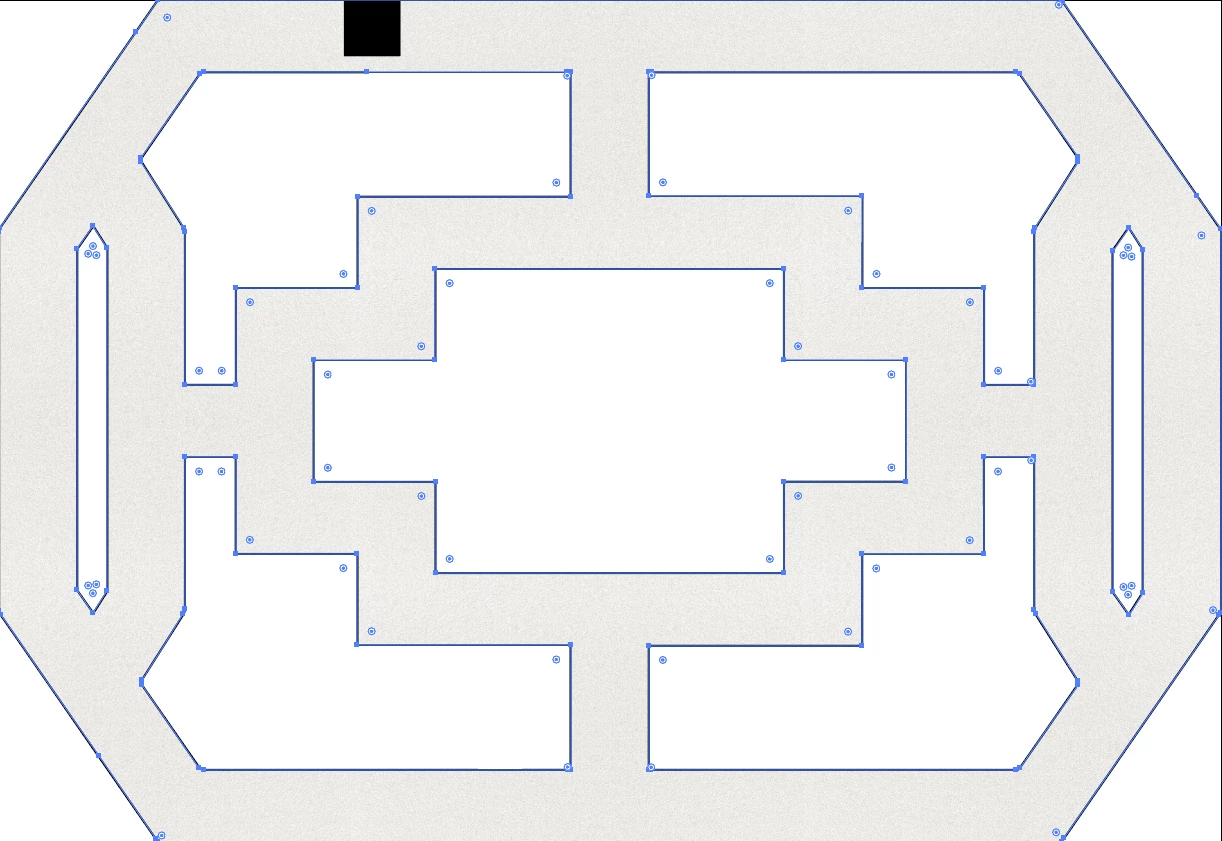
A client brought in an illustrator file of a frosted window pattern that he would like re-sized to a 1" thickness all around.   I have provided a screenshot with all anchor points visible - the goal is to make the "frosted" area equal to 1" across the entire pattern (black 1" square in picture to help visualize).


Sorry if this isn't well explained - hoping somebody may know an "easy" way to do this.  Thanks
This topic has been closed for replies.
Correct answer SJRiegel

If the thickness is currently consistent, you could use Offset Path. Since I assume the outside dimension has to remain as it is, you would have to release the compound path, and then use Offset Path on the inner elements -- this will get you most of the way there, but may still require some tweaking.

1 reply

SJRiegelCorrect answer
Legend
September 11, 2020

If the thickness is currently consistent, you could use Offset Path. Since I assume the outside dimension has to remain as it is, you would have to release the compound path, and then use Offset Path on the inner elements -- this will get you most of the way there, but may still require some tweaking.

Joely10623436
Community Expert
Community Expert
September 11, 2020