
Known Participant
May 25, 2010
Answered

Skewed shapes in Illustrator how to undo it?

  • May 25, 2010
  • 7 replies
  • 82761 views


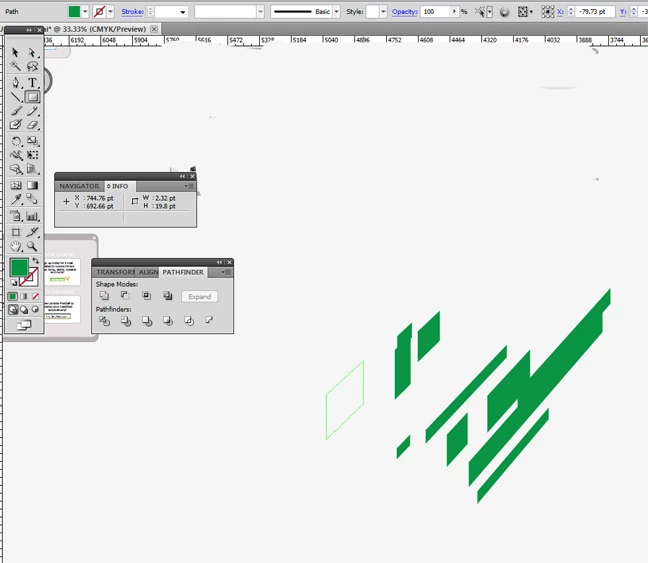
Hi, I'm using cs5 illustrator on windows7.  When I use the rectangle tool  it comes out skewed which is neat...but now I want the normal rectangles to create with. Where is the option to toggle skewing shapes to normal?  Thanks.  I'm still new to cs5.
This topic has been closed for replies.
Correct answer Monika Gause

Looks like youre drawing on a perspective grid. You could use View > Perspective Grid > Hide Perspective grid

7 replies

Helmo
Participant
July 26, 2024

MAESTRO! ty 😄

Participant
August 17, 2021

This happens to me once a year and I always have to google how to get rid of it. Hate it. Thanks for this answer.


Participant
May 31, 2020

yes!!!!!!

Participant
May 23, 2020

Thank you so much! You just saved me !!

Participating Frequently
October 29, 2018

Thanks for the fix, I accidentally turned this on as well!! Very common mistake, I guess. :-)

Participant
November 21, 2017

THANK YOU!!!! I accidentally turned that on!!!!!

Monika Gause
Community Expert
Monika GauseCommunity ExpertCorrect answer
Community Expert
May 25, 2010

Looks like youre drawing on a perspective grid. You could use View > Perspective Grid > Hide Perspective grid

user7777Author
Known Participant
May 25, 2010

Thank you, that did the trick.

NewYorkFruit
Inspiring
May 26, 2010

While working with the Perspective Grid, you can press the number 4 key  or  click in the circle outside the cube in the perspective widget to draw off the grid.