
Inspiring
July 12, 2018
Answered

Slanted edges get pixelated when Photoshop filters are applied

  • July 12, 2018
  • 1 reply
  • 1124 views

Hello everyone

I'm using Adobe Illustrator CC 2018 and encountered a nagging problem with its Photoshop filters.

Whenever I apply any filters to any shape with slanted edges in Illustrator, the edges get terribly pixelated:
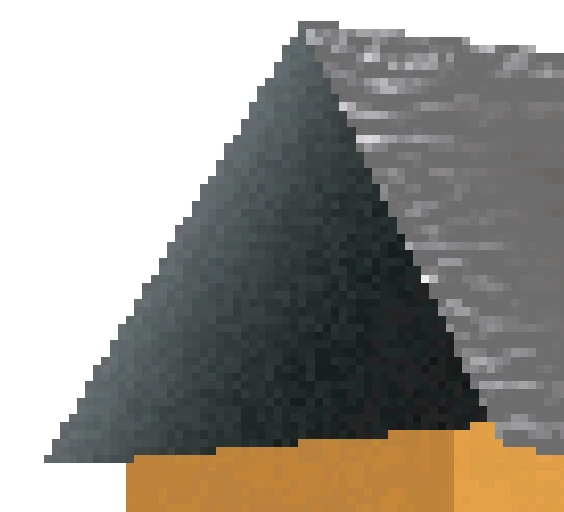
Other effects of Illustrator such as glow do not induce such pixelation.

A thread on the closest problem is this one,

but enabling Overprint Preview/Pixel Preview does not clear up the pixelation:

Jagged edges on all vector paths in Illustrator CC2015

Please someone provide me with a workaround.

Thank you in advance,

Ead

This topic has been closed for replies.
Correct answer Monika Gause

Those are raster effects. Of course it will introduce pixels.

You could try and open Effect > Document raster effects settings. There you can increase resolution, crop the edges or anti-alias the edges. Maybe that helps. But there are effects that just work that way.

1 reply

Monika Gause
Community Expert
Monika GauseCommunity ExpertCorrect answer
Community Expert
July 12, 2018

Those are raster effects. Of course it will introduce pixels.

You could try and open Effect > Document raster effects settings. There you can increase resolution, crop the edges or anti-alias the edges. Maybe that helps. But there are effects that just work that way.

EadigAuthor
Inspiring
July 12, 2018

Thanks. The pixelation was due to the resolution being set to 72 ppi.

Changing it to 300 ppi resolved cleared the mess up.

Monika Gause
Community Expert
Community Expert
July 12, 2018

Glad you could solve it easily and thank you for the added information.