Slopes of anchor points corrupted after PDF import
When I open a PDF in Adobe Illustrator that I previously created in Adobe Photoshop, the slopes of the anchor points of a shape are corrupted. The interpolation between the anchor points doesn't seem to work properly at some point. As a result, the shape looks deformed and egded, as if drawn with a shaky hand.
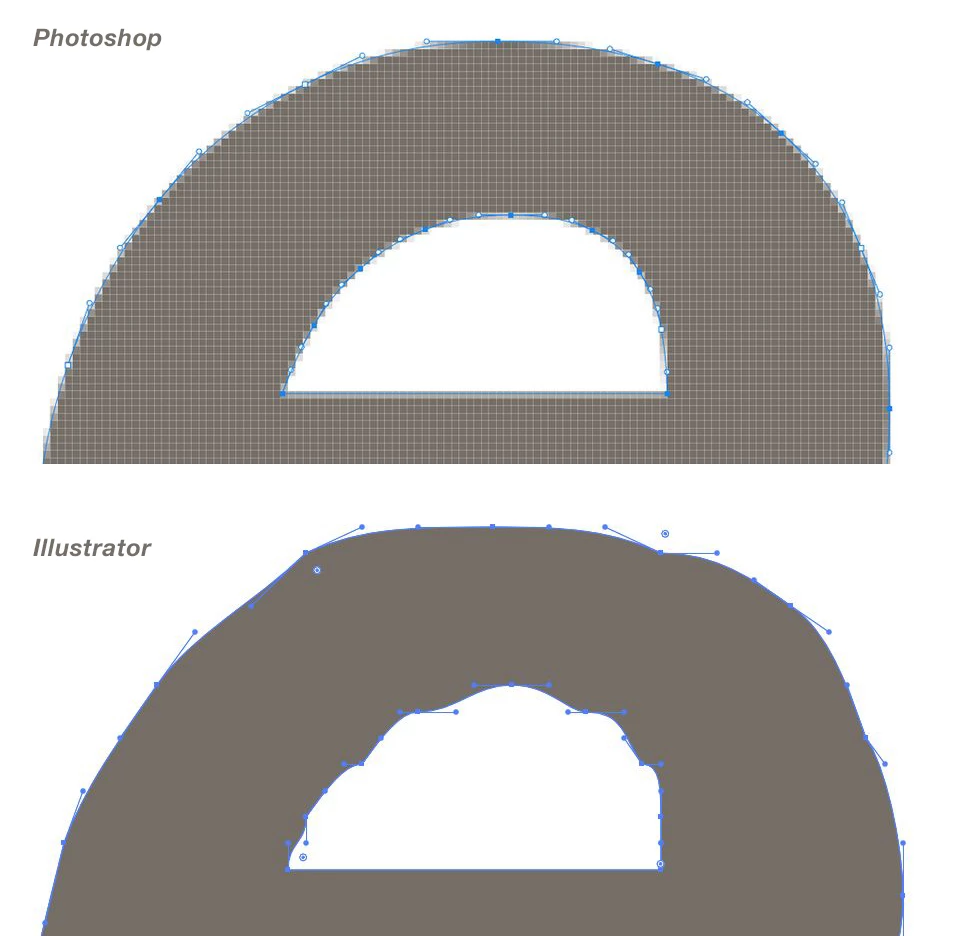
I don't know if it's due to the export from Photoshop or the import in Illustrator. The PDF is displayed correctly in Adobe Acrobat Pro.
Does anyone know this problem? It seems to me like a bug - or maybe it's something in my settings? I've tried a lot to fix it, for example looking for settings for the interpolation method or path smoothing, but haven't found a solution.
Adobe Illustrator (version 27.2)
Adobe Photoshop (version 24.1.1)
Adobe Acrobat Pro (version 22.0)
 AdChoices