
Participating Frequently
August 24, 2020
Answered

Slow performance with 3d effect illustrator

  • August 24, 2020
  • 3 replies
  • 9819 views

Hi, 


I have noticed that the loading time for even simple changes/adjustments are taking a very long time when using 3d effects, I am talking about several seconds (4 or 5). I never encounted this performance/lag with any program or - to stay relevant - with any other effect. Besides, Illustrator is taking no more than 10% of my ram. 


Does anyone have the same problem, or in anyway a solution?


Thanks in advance! Kind regards, Josh
This topic has been closed for replies.
Correct answer kphotopage

Outline Text, Cut

Effects> Transform.(45 angle). Then Expand.

Shape Builder (+Op) minus.


Fills.


BTW, I random recolor as I work.

Often times I do _v1,_v2_v3 as I work.

Well labeled Layers.

Can walk back if needed for edits.


K

3 replies

Participant
September 14, 2023

only update your ram, it's will be more smooth when you use 3d effect, i have the same problem with you and sometimes they said not enough ram to save.

kphotopage
Legend
August 25, 2020

I remember viewing that tutorial some years back.

https://www.youtube.com/watch?v=F5QeoXNdk7A&mv=social&mv2=owned_social&fbclid=IwAR3EFkqVP0GOhFmZre5RaqkYmB914go_RLTnHTKkOwUyl-qkeHLZQJu8qSM


Don’t remember how they constructed.

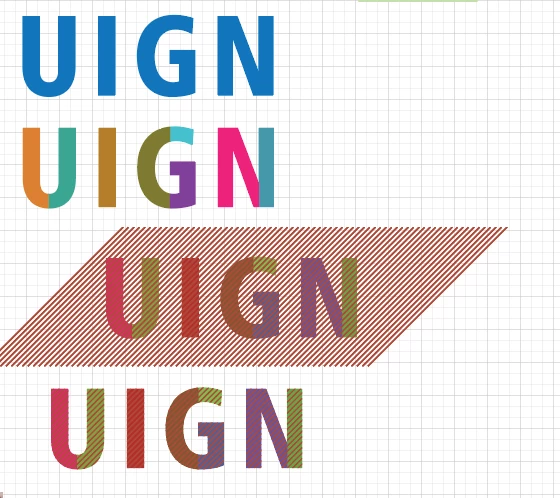
I used Fills. No pattern swatches, no masking, no overlaps. Outline Type

Did the 3D Rotate. Expanded.

Lastly, did the 3 layers. See image below.


With 3D Rotate, I have no lag as you asking. I checked my file again today.

Presently using Mac OS Catalina, Illustrator CC 2019


K

Participating Frequently
August 25, 2020

Hi, 


Thank you very much for trying it out yourself and the provided feedback! I´ll try it again with the method you used. 


Let me try it today. I will let you know if this worked out.


Edit: I am very curious though how you make those lines in the letters without swatches, mask. I can not find any other solution. How did you do this?

kphotopage
kphotopageCorrect answer
Legend
August 25, 2020

Outline Text, Cut

Effects> Transform.(45 angle). Then Expand.

Shape Builder (+Op) minus.


Fills.


BTW, I random recolor as I work.

Often times I do _v1,_v2_v3 as I work.

Well labeled Layers.

Can walk back if needed for edits.


K

Monika Gause
Community Expert
Community Expert
August 25, 2020

Please show the 3D object.

Is it complex, does it have self overlapping shapes?

Participating Frequently
August 25, 2020

Hi, 


It aint complex at all. I added an attachment so you can take a look. 


It is as simple as a double text with 3d effect.


To be honest. I dont know what you mean with overlapping shapes.. It has a text over text though.


Monika Gause
Community Expert
Community Expert
August 25, 2020

And this is the font that looks that way? Or a pattern you applied?

Which 3D effect did you use?