
Smart guides conflicting with shift+rotation
Hello,
I have searched for an answer to this problem, but I just find topics about smart guides' precision. My problem is that when I select and object, press R to rotate, leave the rotation point at the center of the object then click outside and drag while holding shift the rotation begins to "wig out" as in it will only snap to angles if my cursor is directly at that angle from the rotation center. I expect it to snap to the nearest 45°. I noticed that if I turn off smart guides entirely, rotating an object while holding shift behaves as I expect it to so I wonder if it is somehow conflicting? I have this problem even in a new document with nothing but the shape I'm editing. I originally had this problem on a different computer, and when I moved to my current computer it worked as expected, but recently I have encountered it again.
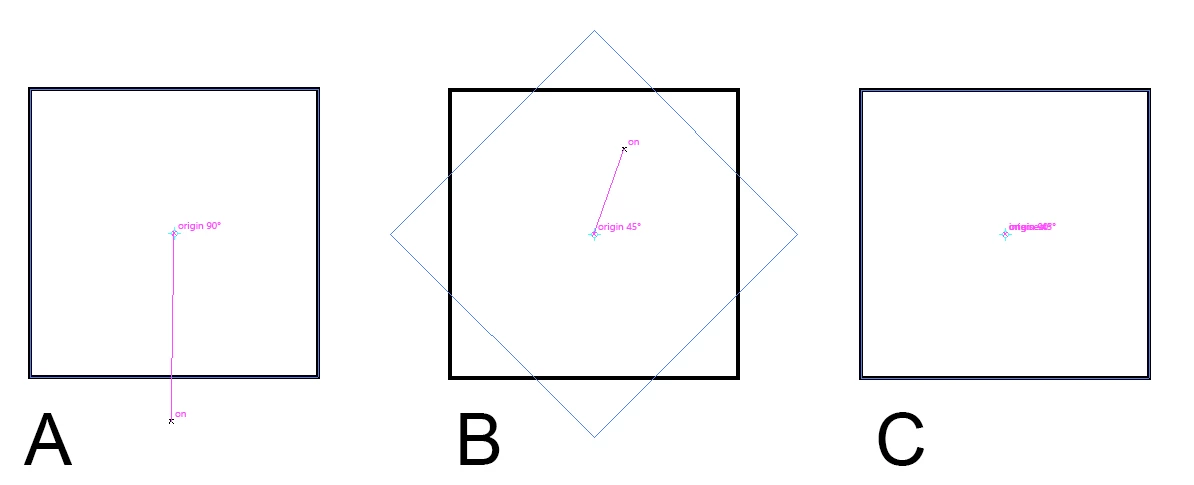
As you can see in the image I've attached, example A shows it snapping to a 90° angle from the origin however it is plain to see it is not truly 90° from the origin. B indicates something similar to A. C represents what the smart guides readout shows when my mouse is not at one of the angles it's snapping to. I've also included my smart guides preference panel.
I'm using Adobe Illustrator CC release 2017.1.0, version 21.1.0 (64-bit) on Windows 10.
If you need any more information please let me know.
Thanks.
 AdChoices