Participant
December 13, 2013
Answered

Smart Guides Not Showing

  • December 13, 2013
  • 4 replies
  • 42955 views

Hi,

Smart Guides are not showing when I use Adobe Illustrator CC.

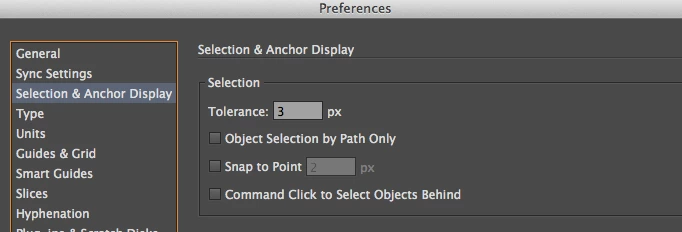
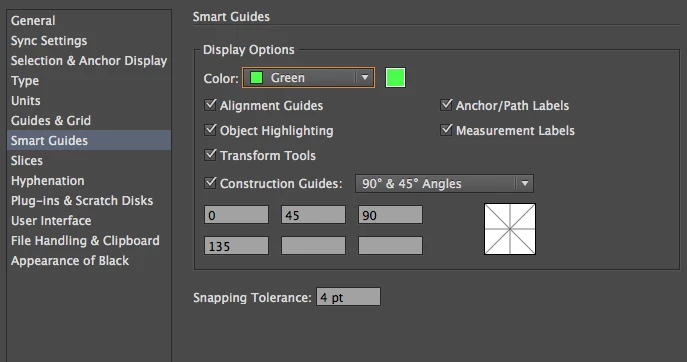
There were several posts in this forum that suggest turning of "snap to grid" and double checking the preferences that smart guides are on. I've done both and provided screenshots.

Smart Guides is very important feature to me. I need it urgently back on.
Thanks

This topic has been closed for replies.
Correct answer Larry G. Schneider

Any chance you might have have hit Cmd(Ctrl)-U which is the toggle for Smart Guides?

4 replies

Participant
July 8, 2019

TNX!!!

scubatankAuthor
Participant
December 13, 2013

Thank you so much - Command-U brought back the smart guides - looks like the preferences are not the final word whether smart guides show up. There is an additional toggle under the "View" menu ... kind of confusing. I would have thought that the preferences were the final say on whether guides are on or not.

Thank you for helping me turn them back on!

Jacob Bugge
Community Expert
Community Expert
December 13, 2013

amarzum,

It could be a preference corruption.

You may try to:

1) Close down Illy and press Ctrl+Alt+Shift/Cmd+Option+Shift during startup (easy but irreversible);

or:

2) Move the folder Other options (follow the link with that name) with Illy closed (more tedious but also more thorough and reversible).

Participant
December 3, 2021

WOW thank you SO SO SO SO much

Jacob Bugge
Community Expert
Community Expert
December 3, 2021

You are welcome, Whitley.


Larry G. Schneider
Community Expert
Larry G. SchneiderCommunity ExpertCorrect answer
Community Expert
December 13, 2013

Any chance you might have have hit Cmd(Ctrl)-U which is the toggle for Smart Guides?

Participant
October 11, 2017

It helped me also to turn off "Snap to grid" option.