


Participant
August 6, 2025
Answered

Smooth 'ribbons'

  • August 6, 2025
  • 4 replies
  • 363 views

Hi, I'm trying to create a graphic of overlapping ribbons of varying widths. See attached files - I started with a thick black stroke and customised the stroke width along its length. Then I've added white strokes on top and used those to divide the black path (after expanding it), to end up with the coloured version. 


Is there a better way to do this so that each individual ribbon is smoother? It's been challenging to get the curves to transition smoothly - see 'ribbons 3.jpg' attached for highlighted problem areas.


I'd also like to add a shadow in the corners to give more depth to the graphic - any tips on that would also be appreciated!

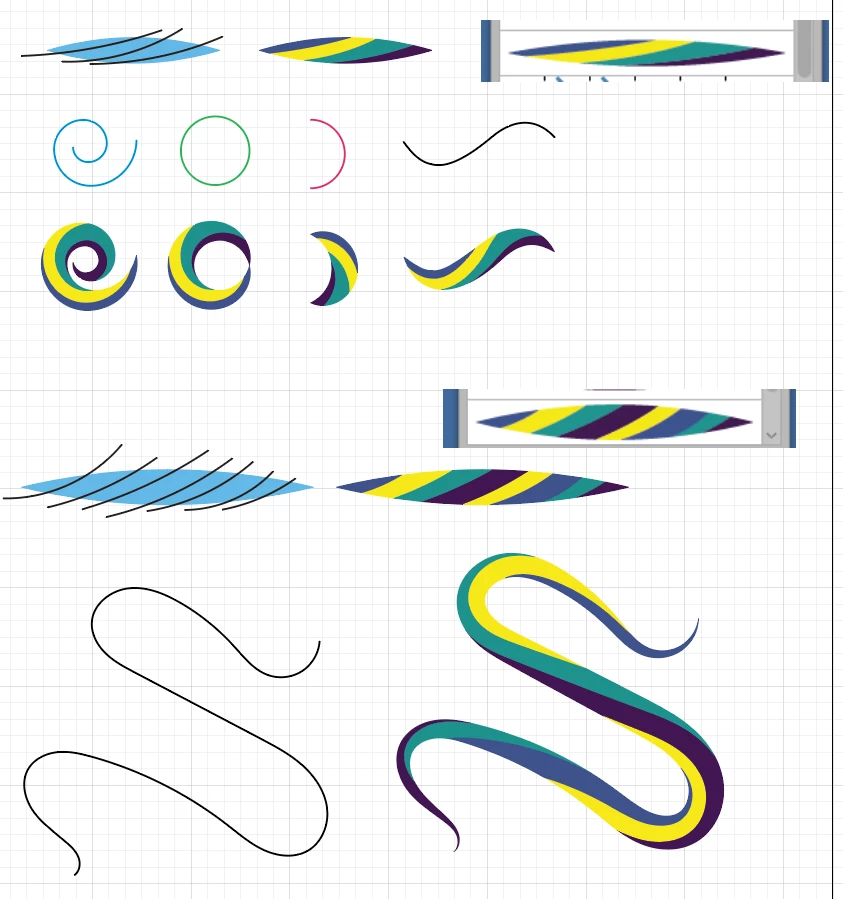
Correct answer kphotopage

Jane, hi.

Long ago I created a similar file. I created several different Art Brushes.

First, I created an ellipse and randomly drew some strokes and then used Pathfinder’s Divide.

Ungroup and recolor.

Group your shapes and create an Art Brush.

Apply your Art Brush to a stroke.

Fun to play with.


K

4 replies

kphotopage
kphotopageCorrect answer
Legend
August 8, 2025

Jane, hi.

Long ago I created a similar file. I created several different Art Brushes.

First, I created an ellipse and randomly drew some strokes and then used Pathfinder’s Divide.

Ungroup and recolor.

Group your shapes and create an Art Brush.

Apply your Art Brush to a stroke.

Fun to play with.


K

Jacob Bugge
Community Expert
Community Expert
August 7, 2025

Jane,


I believe you may regret it if you really succeed in smoothing the transitions.


As I see the images, the way the ribbons/curves meet/end at distinct angles/points gives depth to the graphic, the ribbons appearing as faces/facets.


This is more apparent in the coloured version, but versions based on the original black can be as subtle or obvious as you wish with different sets of shades from black to(wards) white.


You can also work on a number of copies at the same time and try out colour/shade combinations, including different contrasts between adjacent ribbons, and see where it brings you.


So why a shadow?


Monika Gause
Community Expert
Community Expert
August 7, 2025

When adding the white lines, make sure the handles of their endpoints are tangential to the paths they are attached to.


As for adding the depth with shadows - I'm not quite sure what your issue is with those. could you perhaps also post a screenshot?

barbara_a7746676
Community Expert
Community Expert
August 7, 2025

You could select the path and go over the bumpy areas with the Smooth tool