


Participant
April 9, 2021
Question

Snap centre to grid
  • April 9, 2021
  • 4 replies
  • 830 views

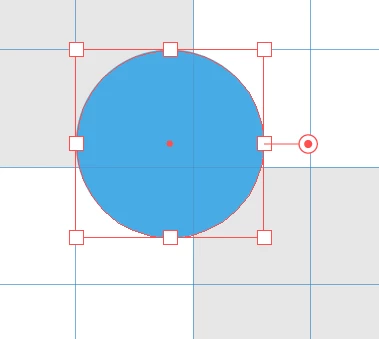
I'm trying to align the centre of this object to the grid, but as you can see it keeps snapping the edges to the grid. Please tell me, how do I snap the centre, not the edges, to the grid? I've tried changing the reference point of the object in the Transform Panel, but that has no effect.


4 replies

Known Participant
August 19, 2025

Still no fix for this? Illustrator is brain-dead sometimes.

Ton Frederiks
Community Expert
Community Expert
August 19, 2025

Looks like the current beta can do this.

Ton Frederiks
Community Expert
Community Expert
April 9, 2021

Instead of using a grid, you could create your own made with Guides on a dedicated layer and use Smart Guides.

tromboniator
Community Expert
Community Expert
April 9, 2021

In the Transform Panel, with the reference point set to center, enter the x and y values for the desired position of the center point.


Peter

Participant
April 9, 2021

Thanks Peter. That works in each instance, but it will be tiresome for lots of objects.


I've tried adjusting the grid now, to make it finer. Not ideal, there is a carpet of gridlines now!, but I can snap to that point.

Inspiring
April 9, 2021

You can try to zoom in further and see if that helps.


Alternatively you can install https://astutegraphics.com/plugins/colliderscribe and activate a 7-day trial. The Collision Tools are a great help and give you finer control on snapping adjustments.