Participant
August 29, 2017
Answered

Solid shape pixelation bug?

  • August 29, 2017
  • 6 replies
  • 702 views

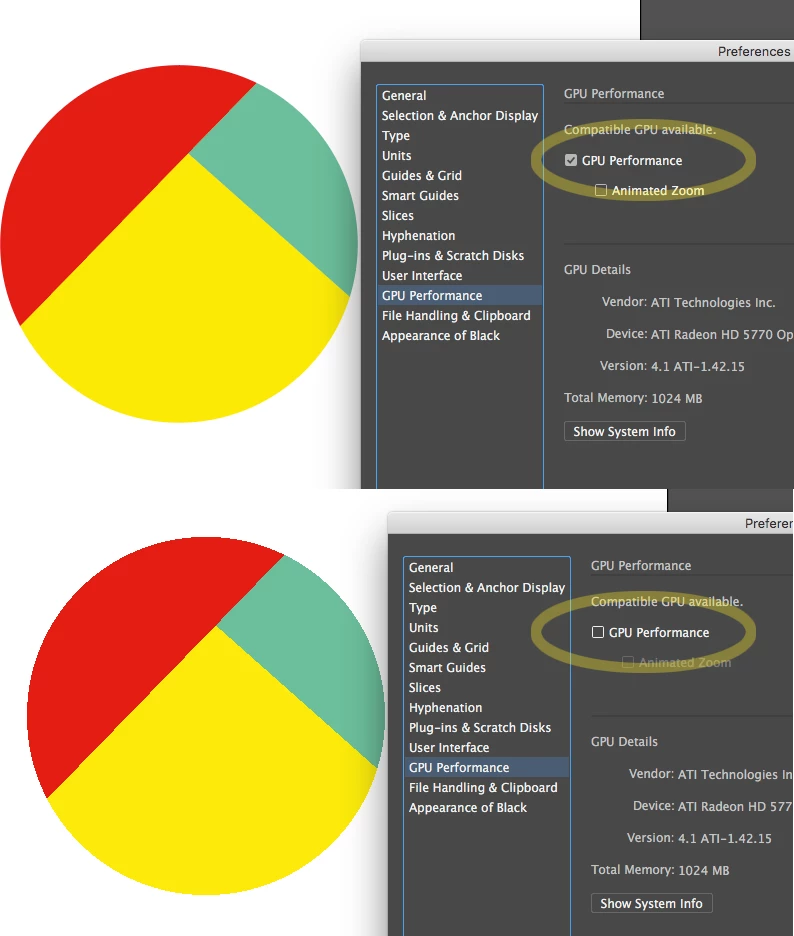
Having an issue where solid shapes show up pixelated near the edges. I originally though this was an issue with my screen, or my resolution, but after using the pathfinder>exclude option I ended up with the second image. Any ideas on what the issue could be? The lines are selectable individually, as if it were a 16-color image trace of a real photo or something.

    This topic has been closed for replies.
    Correct answer ceyhun_akgun

    I turned this option off.

    GPU Performance

    6 replies

    Participant
    May 25, 2018

    thank you. this worked for me.

    Ton Frederiks
    Community Expert
    Community Expert
    August 29, 2017

    And for the first problem, as recommended by others, check the GPU preview.

    And check your video card driver:

    https://illustrator.uservoice.com/forums/601447-illustrator-bugs/suggestions/20444446-font-edges

    ceyhun_akgun
    ceyhun_akgunCorrect answer
    Legend
    August 29, 2017

    I turned this option off.

    GPU Performance

    Graphic Designer Educator / PrePress Consultant
    Ton Frederiks
    Community Expert
    Community Expert
    August 29, 2017

    From the Pathfinder menu, try to increase the Pathfinder Precision setting to something very small like 0,001

    Ray Yorkshire
    Participating Frequently
    August 29, 2017

    In addition to the above answers you may find this Adobe help page useful

    Troubleshoot GPU performance in Illustrator


    Mohammad.Harb
    Community Expert
    Community Expert
    August 29, 2017

    this could be the Graphic Card, Try ctrl + E

    Bill Silbert
    Community Expert
    Community Expert
    August 29, 2017

    Turn off GPU Performance. Click on the rocket ship in the top Illustrator menu.