
Known Participant
March 6, 2022
Question

Some characters shows as box, but when open no error shows in illustrator

  • March 6, 2022
  • 12 replies
  • 2498 views

I have a pdf file, which can be opened in AdobeReader, but can't be opened in Illustrator for some characters are shown as boxes.
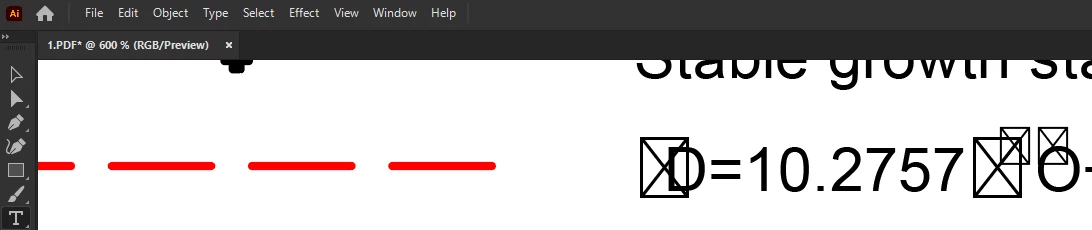
When I opened this file in Illustrator, no reminder showed. How can I make Illustrator show these characters?

Thanks.

This topic is closed to new replies. Start a new post to keep the conversation going.

12 replies

Ton Frederiks
Community Expert
Community Expert
March 6, 2022

It is not recomended to use Illustrator as PDF editor for PDF files that were not created with Illustrator.

In your example the font could be missing or re-encoded.

You could try to place the PDF linked and use Object > Flatten Transparency with Convert Text to Outlines

Known Participant
March 6, 2022

I see in Acrobat, the Framed Boxes are Symbol Font. But I chose Symbol Font in Illustrator, it showed Framed Boxes too. Is there a way to solve this problem? I don't want to convert text to outlines.

Monika Gause
Community Expert
Community Expert
March 6, 2022

Try the "Protected glyph" setting in the Illustrator preferences. If that does not help, then outline.