blueloon4142
Inspiring
November 16, 2020
Question

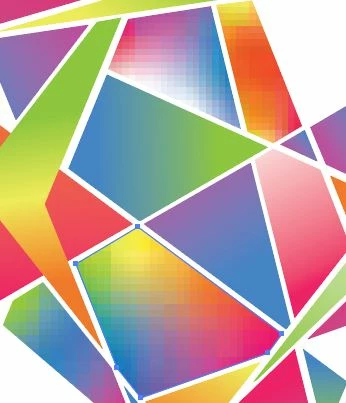
Some gradients have become pixelated and may no longer be edited.

  • November 16, 2020
  • 3 replies
  • 1076 views

Several gradients in my art are no longer editable, and they appear super pixelated (compared to the smooth gradients that still register as gradients). I'm 95% sure this only affects freeform gradients in my art, not linear ones. Is there a way to revert these elements back to freeform gradients so they are smooth again and so I can edit them? Closing and reopening the file doesn't help.


Thanks in advance.
 

This topic has been closed for replies.

3 replies

Ton Frederiks
Community Expert
Community Expert
November 16, 2020

Do you open them (and have you saved them) in the same Illustrator version as you created them?

blueloon4142
Inspiring
November 16, 2020

Yes. Same version as always.

Mohammad.Harb
Community Expert
Community Expert
November 16, 2020

did you rasterize any gradient ? 
if you click on that pixelated object, what is the object type does the control bar show ? 

blueloon4142
Inspiring
November 16, 2020

Under "Object type" it says "group". I'd had certain elements grouped together, but I've ungrouped everything and it still says "group". 


No, I've definitely never rasterized any of my objects, but that is what it looks like. 

blueloon4142
Inspiring
November 16, 2020

I just noticed this, but when I hover the mouse over every element that is pixelated, a blue box with a blue 'x' in it appears over the element. When I select one of these elements and open the "gradient" tool, the mouse displays a little circle with a line through it seeming to indicate I cannot use the tool.


I've never had this problem editing this art before.