
Participant
April 20, 2022
Answered

Spacebar closing Illustrator and not working in text

  • April 20, 2022
  • 5 replies
  • 4461 views

I updated Illustrator on my Mac to the most recent update and now whenever I use the space bar it hightlights the exit button in the top left corner of the app. If I am working on a new doc this brings up the save pop up window and if I am in a doc with no recent changes it exits the app completely. I just want to put a space in between words and not have the app demand to close. How do I fix this?
This topic has been closed for replies.
Correct answer Anshul_Saini

Hi @CHELSEA24125035z8k9,


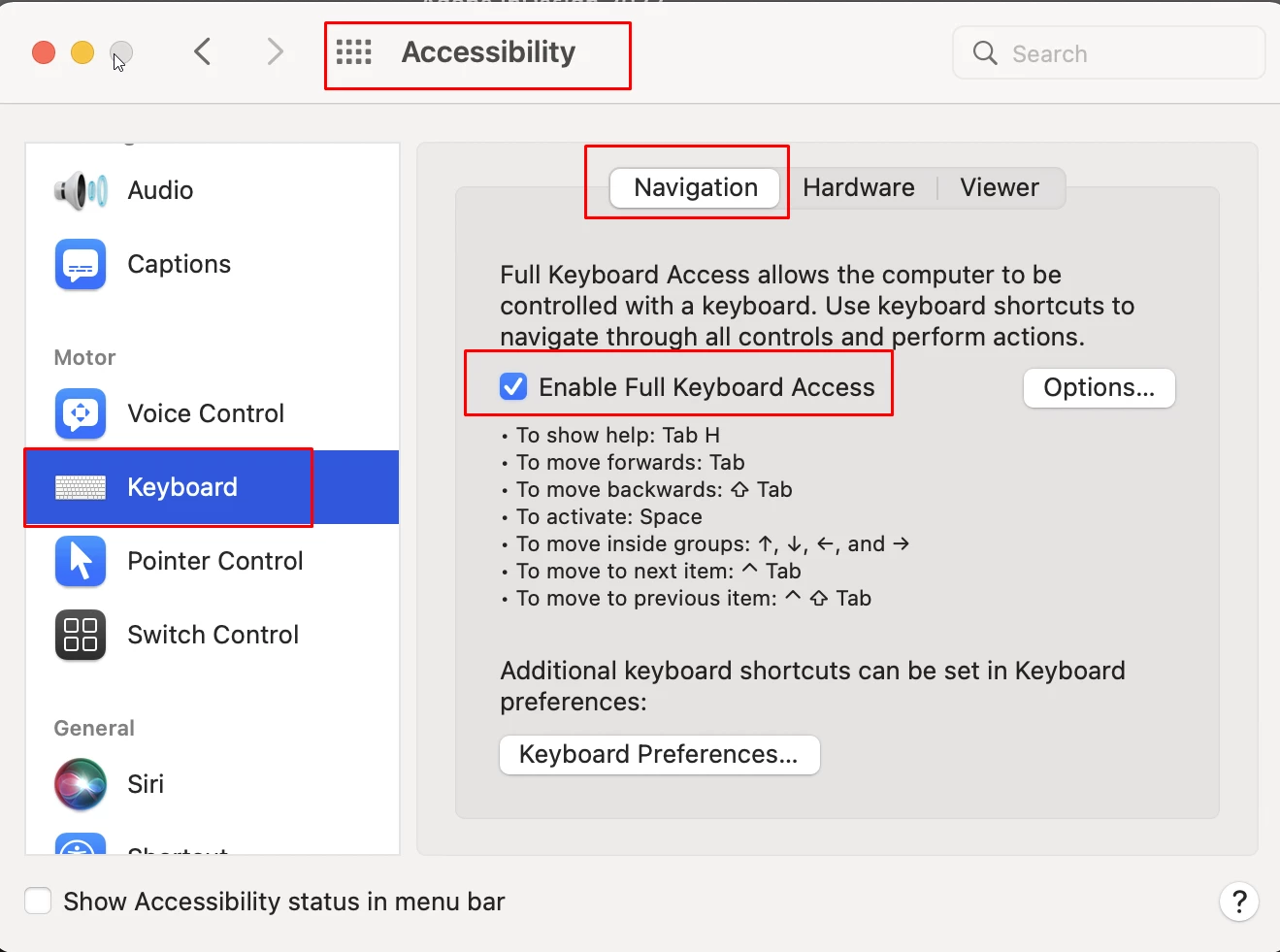
Sorry to hear about your trouble. It seems this is happening due to a new feature/enhancement introduced by Apple in macOS Monterey in Oct 2021. Please try turning off the "Enable Full Keyboard Access" option under Apple Menu > System Preferences > Accessibility> Keyboard > Navigation to resolve this issue.


I hope it helps!


Regards,

Anshul Saini

5 replies

gerryg83w
Participating Frequently
June 12, 2024

I'm not sure when the last AI update occurred, (v28.5) but yesterday the space bar would not work, although it worked i other apps. So after trying numerous solutions, one of which recommended cleaning the spacebar and my breaking the spacebar of my year old iMac magic Keyboard, and wasting a lot of time for which I cannot bill, I found the solution was in Apple settings, Keyboard, and turning off Keyboard Navigation. I wish Adobe and Apple would stop messing around with  new bells and whistles and concentrate on stability and reliability.

Anubhav M
Community Manager
Community Manager
June 12, 2024

Hello @gerryg83w,

We understand that encountering technical issues can be frustrating. Would you mind trying to run Illustrator under Safe Mode (Windows / macOS) and checking if it helps? Also, try running Illustrator under a different administrator account (Windows / macOS) and share your observations.

Looking forward to hearing from you.


Thanks,

Anubhav

Anshul_Saini
Community Manager
Anshul_SainiCommunity ManagerCorrect answer
Community Manager
April 22, 2022

Hi @CHELSEA24125035z8k9,


Sorry to hear about your trouble. It seems this is happening due to a new feature/enhancement introduced by Apple in macOS Monterey in Oct 2021. Please try turning off the "Enable Full Keyboard Access" option under Apple Menu > System Preferences > Accessibility> Keyboard > Navigation to resolve this issue.


I hope it helps!


Regards,

Anshul Saini

Participant
August 3, 2022

This was very helpful!


Kevin Stohlmeyer
Community Expert
Community Expert
April 20, 2022

One other thought. How many fonts do you currently have active?

Participant
April 20, 2022

I just set my apps up on a new computer so it is all the default fonts that are active

Kevin Stohlmeyer
Community Expert
Community Expert
April 20, 2022

How many in total? What are you using for font management?

Monika Gause
Community Expert
Community Expert
April 20, 2022

Are you sure that this is not something in the system interfering here?

Participant
April 20, 2022

I dont think so there is as I have restarted the computer, closed all the programs and only ran Illustrator, and uninstalled and reinstalled Illustrator. I am at a loss at what else to try.

Kevin Stohlmeyer
Community Expert
Community Expert
April 20, 2022

Go to Apple System Prefs/Keyboard/Input Sources. Check show input sources in menu bar.

This will allow you to show the Keyboard Viewer.


It gives you a visual cue when you type. Try hitting space bar when in AI again and see what the visual keyboard is showing.


Kevin Stohlmeyer
Community Expert
Community Expert
April 20, 2022

Try resetting your preferences.

Go to Preferences/General and click the reset button. Relaunch AI.

Participant
April 20, 2022

I have tried doing this as well as uninstalling, reinstalling, trying a different update, and restarting my computer to no avail. Thank you for the suggestion though