


May 7, 2018
Question

Specify Dataset name from variable in CSV file

  • May 7, 2018
  • 12 replies
  • 15003 views

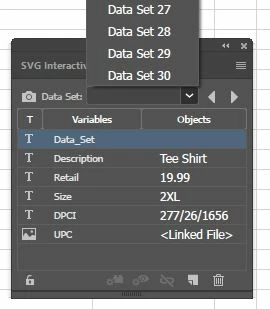
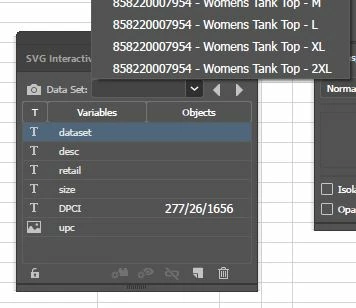
Hello, I am working on a project that contains variable data. I have a CSV setup with 5 text variables and an image link. When I run the import into illustrator everything works as it should on the art board, however the i can't get the data set name listed in the variables window to reflect the name of the field in the CSV "dataset". I have tried this with a quick XML, and it works, however all the data going to our graphics department real time is in CSV. Does anyone know if I have to call out the dataset name in the CSV differently from CSV, or bind it somehow?

See images to show XML vs CSV import.
Thanks in advance,

Jason

12 replies

Participant
August 29, 2026

just rename ithe dataset using this script

// Illustrator Script: Rename Data Sets using Bound Variable Text + Dash + Number
function renameDataSetsWithDashAndNumberFixed() {
if (app.documents.length == 0) {
alert("No document open.");
return;
}

var doc = app.activeDocument;
var datasets = doc.dataSets;

if (datasets.length == 0) {
alert("No data sets found. Please import your variables first.");
return;
}

// Prompt user for the exact name of the variable column to use
var variableName = prompt("Enter the exact column/variable name to use for renaming:", "Name");
if (!variableName) return;

// Find the target variable in the document
var targetVariable = null;
for (var i = 0; i < doc.variables.length; i++) {
if (doc.variables[i].name === variableName) {
targetVariable = doc.variables[i];
break;
}
}

if (!targetVariable) {
alert("Variable '" + variableName + "' not found. Check your spelling and try again.");
return;
}

var successCount = 0;

// Loop through all data sets and rename them
for (var j = 0; j < datasets.length; j++) {
datasets[j].display(); // Switch layout to current dataset row

var varText = "";

// Target the individual page element index [0] to extract real content string
try {
if (targetVariable.pageItems && targetVariable.pageItems.length > 0) {
varText = targetVariable.pageItems[0].contents;
} else if (targetVariable.pageItems) {
varText = targetVariable.pageItems.contents;
}
} catch (e) {
// Second safety path: Look directly at the text frame content if it behaves as a single text frame instance
try {
varText = targetVariable.pageItems[0].contents;
} catch (err) {
varText = "Row";
}
}

// Clean up formatting
if (varText) {
varText = varText.replace(/[\/\\:*?"<>|]/g, "_"); // Remove illegal file characters
varText = varText.replace(/^\s+|\s+$/g, ''); // Trim spaces
}

if (varText === "" || varText === undefined) {
varText = "Row";
}

// Renames to "YourText-1", "YourText-2", etc.
datasets[j].name = varText + "-" + (j + 1);
successCount++;
}

alert("Success! Renamed " + successCount + " data sets.");
}
renameDataSetsWithDashAndNumberFixed();


daniela94508904
Participant
February 13, 2019

Did you find the solution?

CarlosCanto
Community Expert
Community Expert
February 14, 2019

the native feature does not have an option to name Datasets. The alternatives are the use XML or Variable Importer Script mentioned above

ceyhun_akgun
Legend
February 14, 2019

I gave the same answer to a similar title, but I think it might help.

Free Online Illustrator Variables XML editor and converter

Graphic Designer Educator / PrePress Consultant
Silly-V
Legend
May 9, 2018

Why not try to import your data with the VariableImporter script?

Inspiring
November 12, 2019

Are there any APIs in SDK to do the same? I have seen there are DataSet and Variable classes in DOM which fulfill the purpose. But could not find anything in SDK related to DataSet and Variable. 

Any help would be appreciated!

Silly-V
Legend
January 10, 2020

I do not know about the realm of the SDK at this time, only ExtendScript, sorry.