


Babendure
Participant
Feb 25, 2020 5:05 PM UTC
Answered

Spot Swatches changing to Process

Has something changed about Swatch Libraries? I have libraries provided by paint companies and in the past they would stay named spot colors when used in a drawing. Now, using the same libraries, when I use the swatch, it converts to CMYK and loses the name. I can still see the spot swatches in files I worked on a couple months ago, but can't add new colors without it converting.

Ton Frederiks
Ton FrederiksCorrect answer
Community Expert
Feb 26, 2020 12:30 AM UTC

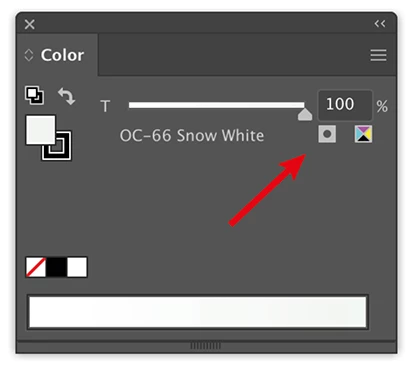
That is how it looks when it is a normal CMYK color swatch, you will see the percentages.

If you double click the swatch and check Global you will get what you saw before.

But a spot color is different and looks like this:

12 replies

Jun 27, 2020 4:43 AM UTC

Hello, Ton!

Do you know how to activate the Global option on Swatch options in Illustrator using a Script?


Translate
Participant
Jan 9, 2025 11:21 AM UTC

I NEED ALSO CHANGE THIS COLOR TYPE : SPOT TO PROCESS... BUT THIS IS NO WORK?

Translate
Monika Gause
Community Expert
Community Expert
Jan 9, 2025 11:29 AM UTC

Can you share a file that contains this swatch? Rename the extension from ai to pdf then you can share it in this forum.

How did you get the swatch? Via Pantone Connect?

Translate
Ton Frederiks
Community Expert
Ton FrederiksCommunity ExpertCorrect answer
Community Expert
Feb 26, 2020 12:30 AM UTC

That is how it looks when it is a normal CMYK color swatch, you will see the percentages.

If you double click the swatch and check Global you will get what you saw before.

But a spot color is different and looks like this:

Translate
Babendure
BabendureAuthor
Participant
Feb 26, 2020 4:00 PM UTC

Ah, I see that I'm saying spot color when I mean global color. Is there a setting somewhere that make global swatches automatic when pulling from a library? I know I didn't manually change it to a global color before.


The library seems like it's different too. Here's a comparison with a library from another company. I thought the Benjamin Moore used to be searchable and viewable as a grid, like in the Sherwin Williams library example. Not it shows as a series of folders, not global colors, and the search function doesn't work within that library.

Translate
Ton Frederiks
Community Expert
Community Expert
Feb 25, 2020 10:26 PM UTC

I downloaded the ase file.

I can get them into Illustrator and InDesign.

The swatches keep their name, but depending on the document color mode they display as CMYK or RGB.

No spots even tried older AI versions, bu they are all process colors.


Translate
Babendure
BabendureAuthor
Participant
Feb 25, 2020 11:55 PM UTC

Thanks for checking. Maybe I did something different and forgot about it. Here's how the swatch showed when I did it before. (It still looks like this in the file.)


Here's what it looks like when I try it now. I select the swatch from the library, but it shows as CMYK.

Translate
Babendure
BabendureAuthor
Participant
Feb 25, 2020 8:56 PM UTC

Here's a link to one provided by Benjamin Moore paint, if you have time to test it.

https://www.benjaminmoore.com/-/media/sites/benjaminmoore/files/palettedownloads/ase/en-us/benjaminmoore_off-whitecolors_en-us.ase

Translate
Ton Frederiks
Community Expert
Community Expert
Feb 25, 2020 7:47 PM UTC

I cannot reproduce that.

Even if I set in the Swatches Panel menu > Spot Colors... >Use CMYK values from the manufacturer's process books.

Translate
carlosgarro
Community Expert
Community Expert
Feb 25, 2020 7:35 PM UTC

This is a weird behaviour, because I can open ".ase" files without any issue. Please check the video.

Import Spot Colors 

Translate
Ton Frederiks
Community Expert
Community Expert
Feb 25, 2020 5:09 PM UTC

Are you using CClibraries?

Translate
Babendure
BabendureAuthor
Participant
Feb 25, 2020 7:10 PM UTC

Everything is local. One example is a .ase file manually placed in the Illustrator Swatches folder. It's strange that it worked a couple months ago.

Translate