briand75215831
Participating Frequently
August 8, 2018
Answered

Square off bottom of Image in AI

  • August 8, 2018
  • 3 replies
  • 1265 views

I appreciate the help I received on the discussion board. 
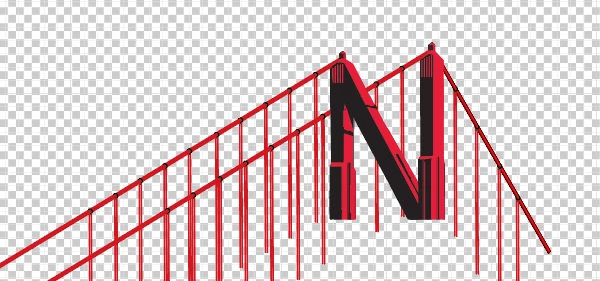
Since I used 3D for the cables, I can not figure out how to square off the bottom of the image at the bottom of the "N". 

The image is in the middle of the Art Board.

Brian

    This topic has been closed for replies.
    Correct answer Monika Gause

    I put in the line.  I was able to hide the N, but I can never get anything to delete below the line?


    Just draw a rectangle. The rectangle where you want elements to appear.

    Make sure the rectangle's on top of all.

    Then select all and Object > Clipping Mask > Make

    3 replies

    Jacob Bugge
    Community Expert
    Community Expert
    August 8, 2018

    Brian,

    As I (mis)understand it, you can use a Clipping Mask, or if you have filled paths you may draw a horizontal line, then lock/hide the N, then select the line and Object>Path>Divide Objects, then delete the superfluous lower parts of the suspenders.

    briand75215831
    Participating Frequently
    August 8, 2018

    I am not having much success so far!

    Monika Gause
    Community Expert
    Community Expert
    August 8, 2018

    Please show what you have achieved so far.

    Kris Hunt
    Legend
    August 8, 2018

    If you draw a horizontal line at the bottom of the N that intersects everything you want to chop off, you can use the Shape Builder tool (with the Option modifier key held down) to delete anything underneath that line. If the vertical lines are strokes, you will need to click on them individually first before scrubbing over any filled shapes.

    Abambo
    Community Expert
    Community Expert
    August 8, 2018

    Discussion successfully moved from Adobe Creative Cloud to Illustrator

    ABAMBO | Hard- and Software Engineer | Photographer