Known Participant
February 23, 2019
Answered

Squares and rounds crooked with RECTANGLE tool

  • February 23, 2019
  • 1 reply
  • 1978 views

Hi!

Must be some basic setting which I don't see here now...

When useing rectangle tool all the squares and circles become crooked.

How to get the tool back to 'normal?'

Thank's!

Johnny

    This topic has been closed for replies.
    Correct answer tromboniator

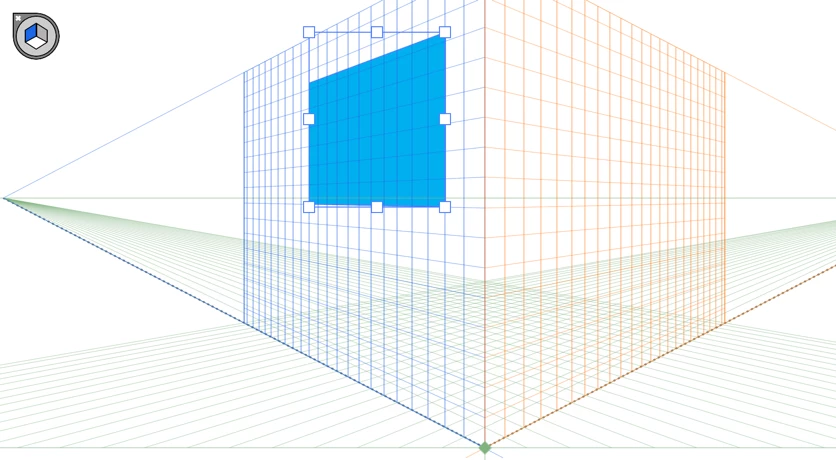
    Something like that? That's the Perspective Grid, which you can read about in the documentation. May or may not be of interest to you, but it's more than I care to tackle at one go in the forum!

    Peter

    1 reply

    tromboniator
    Community Expert
    Community Expert
    February 24, 2019

    Hi, Johnny,

    Crooked A or crooked B?

    If A, Go to Preferences > General. For rectangles aligned vertically and horizontally to the document, the Constrain Angle should be set to 0°. If it is not, you may reset it. this is by far the most likely scenario.

    If B, there may be a distorting effect applied, which you should be able to see in the Appearance panel.

    Peter

    JoninenAuthor
    Known Participant
    February 24, 2019

    Corner radius was 0° and I couldn't find anything from appearance panel either.

    BUT I clicked on that little 3D-icon on the upper left corner (of the screen), and suddenly squares and circles are again squares and circles.

    Obviously there was some kind of 3D-effect present...? (No idea what that icon was).

    Thank's anyway, Peter!

    Johnny

    tromboniator
    Community Expert
    tromboniatorCommunity ExpertCorrect answer
    Community Expert
    February 24, 2019

    Something like that? That's the Perspective Grid, which you can read about in the documentation. May or may not be of interest to you, but it's more than I care to tackle at one go in the forum!

    Peter