jenaym13761845
Participating Frequently
September 1, 2017
Answered

Start workspace in Illustrator CC 2017 missing

  • September 1, 2017
  • 3 replies
  • 1132 views

Im trying to get to the mobile creations on the start screen but am not able to get the start screen to show up

Anyone know how to get it back up?

    This topic has been closed for replies.
    Correct answer Srishti_Bali

    Hi jenaym,

    Please make sure that "Show The Start Workspace When No Documents Are Open" is checked.
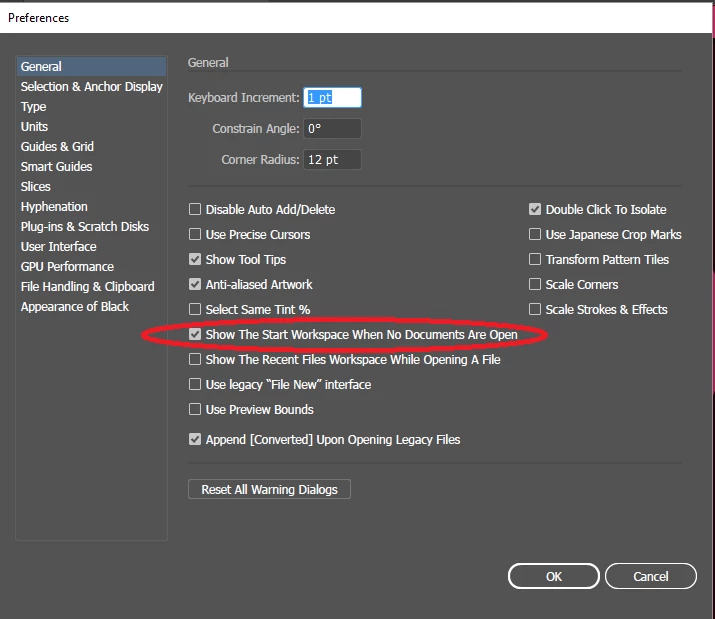
    Illustrator workspace basics

    If it still does not work try restoring preferences  to defaults: How to set preferences in Illustrator

    Regards

    Srishti

    3 replies

    diegos39555208
    Participant
    May 4, 2018

    Same here, and the Show The Start Workspace When No Documents Are Open, Show the recent File Workspace are check but still nothing

    MY SOLUTION:

    1- Launch your Workspace: Windows>Workspace>My_Workspace (that's how I name it)

    2- Windows>Workspace>Reset My_Workspace

    Srishti_Bali
    Srishti_BaliCorrect answer
    Legend
    October 16, 2017

    Hi jenaym,

    Please make sure that "Show The Start Workspace When No Documents Are Open" is checked.

    Illustrator workspace basics

    If it still does not work try restoring preferences  to defaults: How to set preferences in Illustrator

    Regards

    Srishti

    michelew83603738
    Community Expert
    Community Expert
    September 1, 2017

    What do you mean by start screen? When you go to file new what shows up?