
Participant
March 17, 2022
Answered

Startup Script Error Illustrator
  • March 17, 2022
  • 3 replies
  • 5191 views


Problem with Adobe Illustrator. 

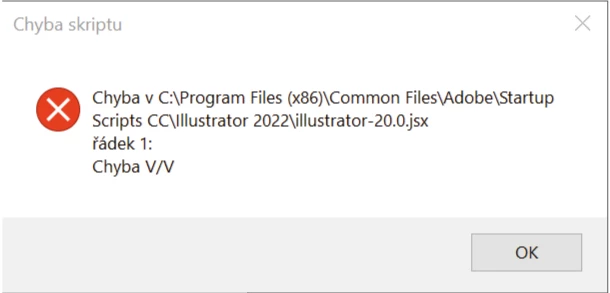
For about a month now, Illustrator has been reporting an error, which can be seen in the image. Furthermore, when saving some data, Illustrator crashes and it is not possible to save the data in it.

I can't save colors to the library as before. The library does not record the color at all. We tried to uninstall the whole program and reinstall it, the problem still persists. Using an older version also didn't help. Please advise how to solve this. Since I use the program to work and I need to work with it as quickly as possible this error bothers me a lot.

Please do not refer me to other discussions, I did not find my problem in them. Thank you
This topic has been closed for replies.
Correct answer Anshul_Saini

Al apretar enter, se cierra por completo el programa. 


Hi  @antonaair _


We are sorry for the trouble. It seems you have not deleted the folder but deleting the scripts one by one. Would you mind deleting the "Startup Scripts CC" folders from both the following locations:

C:\Program Files (x86)\Common Files\Adobe
C:\Program Files\Common Files\Adobe


Let me know how it goes afterward.


Thanks,

Anshul Saini

3 replies

Participant
May 20, 2022

I am having this exact issue with no found solution as of now. SO frustrating, as I need it for work as well.

Anshul_Saini
Community Manager
Community Manager
May 20, 2022

Hi @mose_def,


We are sorry for the trouble. Currently, the product team is investigating this issue. Also, we had a debug session with a couple of users, and deleting the Startup Scripts CC folder or moving them to Desktop worked for them 100%.

Please move the "Startup Scripts CC" folder to the Desktop or delete it from the following locations:

C:\Program Files (x86)\Common Files\Adobe
C:\Program Files\Common Files\Adobe


Let me know if it works for you.

I will be looking forward to your response.


Thanks & Regards,

Anshul Saini

Participating Frequently
January 24, 2023

Hello! I am getting the exact same error and its frustrating. 

Anshul_Saini
Community Manager
Community Manager
March 24, 2022

Hi @defaultfh37suu9ne3w,


We are sorry for the trouble. I would request you to share a few details like:

  • The exact version of OS and its built number
  • The exact version of Illustrator you have installed in which you faced this issue.
  • When did this start happening? Are there any recent changes made to your system? For example, any antivirus, system updates, plugins, or web extensions installed recently.
  • Would it be possible for you to compress the Startup Script folder in the Zip file from the location mentioned in error and upload it to Creative Cloud/ Dropbox or any other similar service and share the download link here with us?


Also, when does this error pop up while launching the app or while using the app? Does the app close/ crash or start not responding after clicking on the "Ok" button?


We are here to help. We just need more information.


Thanks & Regards,

Anshul Saini

Charu Rajput
Community Expert
Community Expert
March 17, 2022

Hi,

Try to move this file from this location to another location and try.

Best regards
Participant
March 24, 2022

I removed the file and it did not fix anything, I am still getting the same error.