



Strange Transformations and Effects Issue - Illustrator 30.5.1 macOS 26.5.1
After updating to 30.5.1, whenever I try to edit an object using a dialog box with the “Preview” checkbox on (simplify, smooth, scale, transform, and any Illustrator Effect), the edits will commit to the object, even if I cancel the dialog box.
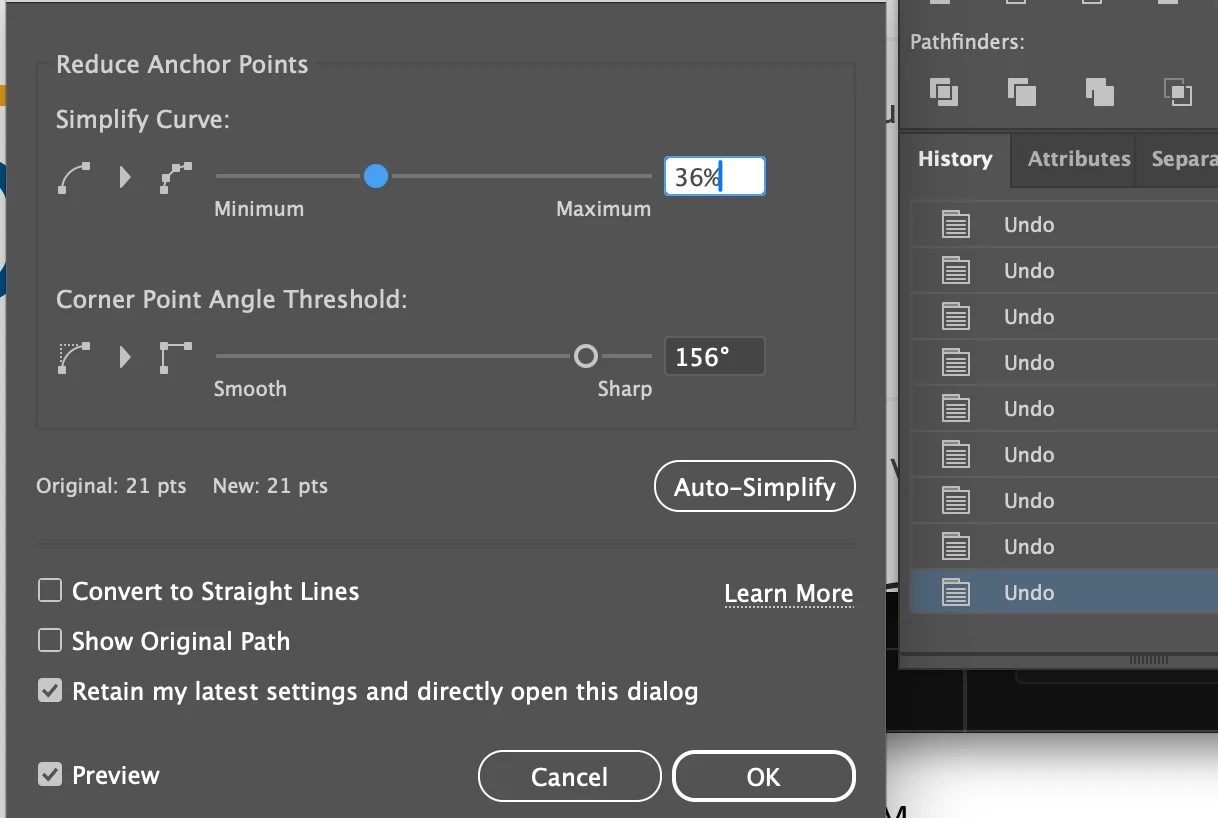
What’s even more odd, is the history panel then shows an individual “UNDO” for every slider or value adjustment that I had made BEFORE canceling or clicking OK in the dialog box.
This is not an expected behavior that I have ever experienced in over 20 years of using Illustrator. I found a bug report from 2019 expressing the same issue, which hasn’t gotten much attention, so I’m assuming it’s not a common issue. But I have no idea what may have caused it in my case, other than updating to 30.5.1. (https://illustrator.uservoice.com/forums/601447-illustrator-desktop-bugs/suggestions/38543185-transformations-committing-even-upon-cancel)
In the attached image, you can see that there is an “UNDO” for every slider adjustment I made BEFORE clicking OK. Clicking CANCEL still applied the current values. This is not specific to any particular file. I can recreate this on any existing or new file, with any object.
I trashed my prefs and restarted, and that temporarily fixed the issue, until I restarted my Mac. Now the issue is back. Mac Tahoe 26.5.1.
Any ideas or solutions?
 AdChoices