

Participant
August 21, 2025
Answered

Struggling to edit when I import an design - it gives blue outlines

  • August 21, 2025
  • 3 replies
  • 188 views

HI all, 


I am trying to edit a document, but I can't do anything as it only shows these blue outer lines. How do I remove them and start editing?
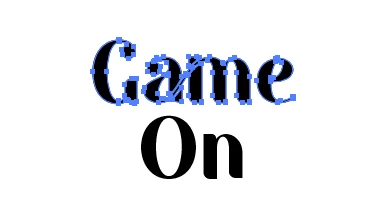

 

Correct answer Dave Creamer of IDEAS

The short answer: you can't edit the text anymore. 


The long answer: someone converted the type to outlines turning it into a graphic. Generally, the is unnecessary unless there is some font licensing issue. 

You will have to figure out the font and recreate the type. If you have trouble figuring out the font, I've had good luck uploading a screen capture to https://www.myfonts.com/pages/whatthefont


3 replies

Dave Creamer of IDEAS
Community Expert
Dave Creamer of IDEASCommunity ExpertCorrect answer
Community Expert
August 21, 2025

The short answer: you can't edit the text anymore. 


The long answer: someone converted the type to outlines turning it into a graphic. Generally, the is unnecessary unless there is some font licensing issue. 

You will have to figure out the font and recreate the type. If you have trouble figuring out the font, I've had good luck uploading a screen capture to https://www.myfonts.com/pages/whatthefont


David Creamer: Community Expert (ACI and ACE 1995-2023)
Brad @ Roaring Mouse
Community Expert
Community Expert
August 21, 2025

If, by editing, you want to do type changes to this text, it's not possible as it's been converted to outlines and is no longer an editable type object. This is a typical end-move when created a custom wordmark, which this appears to be. Although there are tools (Retype) that can now attempt to recognize the font that was used to make it back into an editable object, it would be easier and more accurate to go back to a version where the type is not outlined (assuming you were the one that created it in the first place)

Tina_Irvine
Community Expert
Community Expert
August 21, 2025

Hi @jannike_6522,


The blue lines are correct and shows that it's vector. Use the white arrow to select anchors and handles to edit (the black arrow is for selecting entire objects only). Click on and drag anchors...extend / manuevre handles...you can do all sorts of refinements this way. You can also use the pencil tool.


If you press apple + U / turn on Smart Guides under View, you'll be able to see the names of each node.
