Participant
July 11, 2022
Answered

Sublayers are renamed to <path> after using eraser tool

  • July 11, 2022
  • 1 reply
  • 146 views

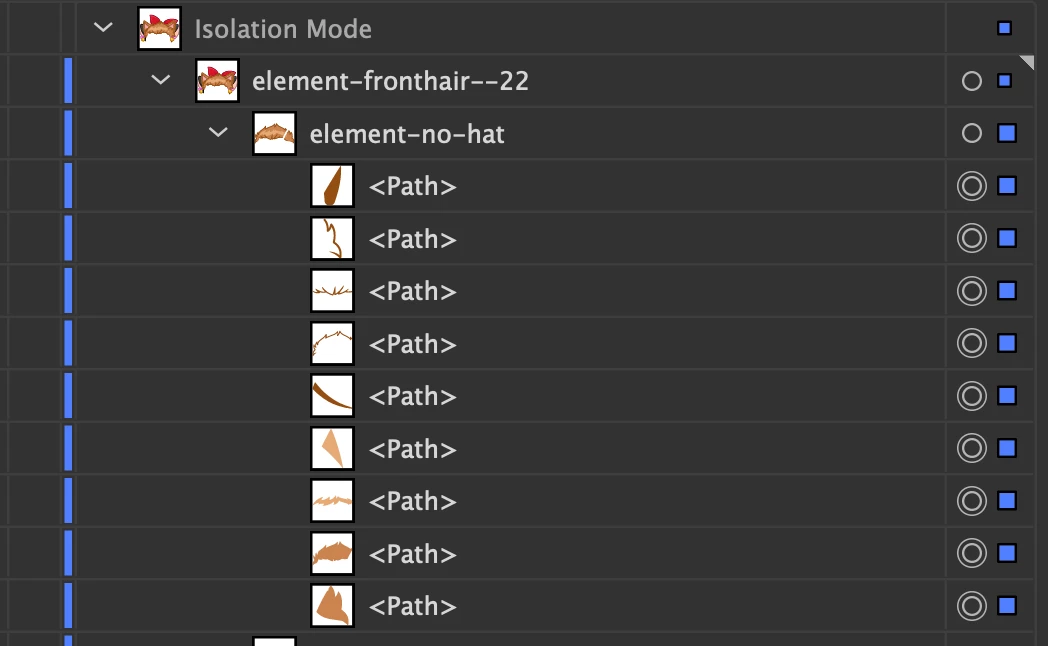
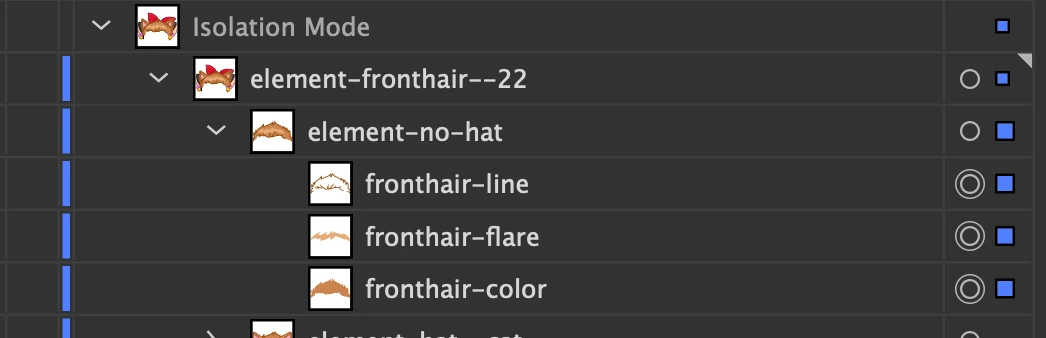
Hello! I have a problem with sublayer names, after using the eraser tool all sublayer names are replaced with <path> and the object is split into small pieces. "Paste remembers layers" is enabled. This problem occurs in all recent versions of Illustrator, on Windows and Mac. How can I fix it? Please help! 
This topic has been closed for replies.
Correct answer Kurt Gold

Well, of course they get split into smaller pieces. That just happens if you erase them.


As for the naming issue, I'm afraid there is no fix at the moment. The generated objects are handled as completely new items and lose their unique names. You may not like it, but it's normal behaviour in Illustrator.


1 reply

Kurt Gold
Community Expert
Kurt GoldCommunity ExpertCorrect answer
Community Expert
July 11, 2022

Well, of course they get split into smaller pieces. That just happens if you erase them.


As for the naming issue, I'm afraid there is no fix at the moment. The generated objects are handled as completely new items and lose their unique names. You may not like it, but it's normal behaviour in Illustrator.


Participant
July 11, 2022

oh, it's sad. Thanks for your answer!