
go2qdesign
Participating Frequently
March 15, 2024
Answered

Suddenly seeing new handles on shaped

  • March 15, 2024
  • 2 replies
  • 587 views

I'm suddenly seeing new handles when I draw a shape using the shape tool. Prior to today, when I drew a shape, I would see small resizing handles at the four corners of a shape and that was all. Now I’m seeing blurry little rotate arrow icons at the four corners and resizing arrow icons at 12,3,6 and 9 o’clock. 
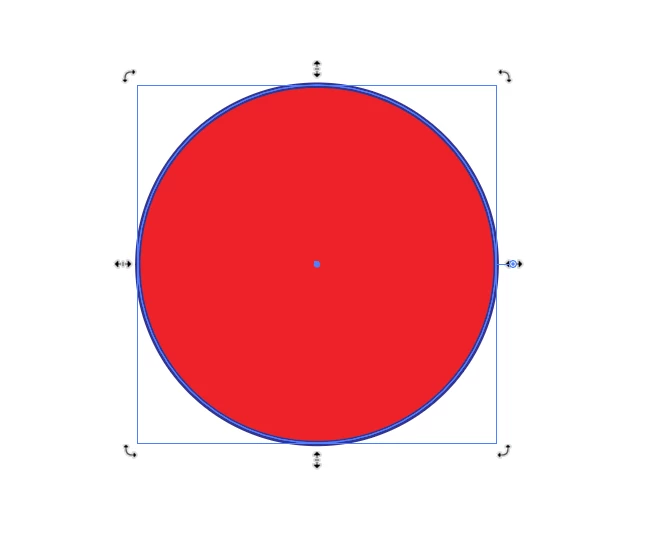
I'm hoping this is just some settings I somehow accidentally activated, and I can undo it. I'll be bummed if this is a new "feature" because it is bloody distracting.


Any help?


This topic has been closed for replies.
Correct answer Monika Gause

Can you please open the Preferences > General. There should be a setting "Enable Rich UI". Can you uncheck that?

2 replies

Kurt Gold
Community Expert
Community Expert
March 16, 2024

Can you share a sample Illustrator file that shows those handles for you?


Just to check if the behaviour may be document-specific or not.

go2qdesign
Participating Frequently
March 16, 2024

Here is an example file.

When I click on any of these shapes I see the crazy new handles.

It happens on any file, new or old.

Monika Gause
Community Expert
Monika GauseCommunity ExpertCorrect answer
Community Expert
March 16, 2024

Can you please open the Preferences > General. There should be a setting "Enable Rich UI". Can you uncheck that?

Monika Gause
Community Expert
Community Expert
March 15, 2024

@Anshul_Saini  could you please help here?