toniak64353278
Participant
July 25, 2017
Answered

Suite colour management is not enabled?

  • July 25, 2017
  • 1 reply
  • 1766 views

Hi,

I am trying to synchronize my Adobe products but when I go to Bridge to do this it comes up with a warning dialogue box that says:

"Suite  Colour Management requires that a qualifying product has been launched at least once to enable this feature" But I have the whole CS6 suite of Adobe products.

Why is this not working please?

The reason I came to this conclusion was initially when I bring up a new document the RGB colour mode has a warning next to it that says;

"The chosen colour mode is different from the colour space defined by the document profile. Panel content may not match the new colour mode"

If I choose a document for web this warning document box goes away. Why is this?

Thirdly, if I choose a custom profile in RGB and the warning is there when I open up the new document, I then go to Colour Settings and it says:

"Unsynchronized. Your creative suite applications are not synchronized for consistent colour. To synchronize, select Suite Colour Settings in Bridge."

Which brings me back to my first point, Bridge won't let me synchronize.

Colour setting modes are all a bit double dutch to me. I originally set them up when I watched a Lynda.com tutorial but must have changed something along the way to get this warning, and recently I saved an RGB logo as a PDF and the colours were muddy. So really need to get this fixed.

Any help on this would be GREATLY appreciated.

Thx

This topic has been closed for replies.
Correct answer Monika Gause

Sorry I can't help you with Bridge. Please try the Bridge forum for help:

Bridge General Discussion

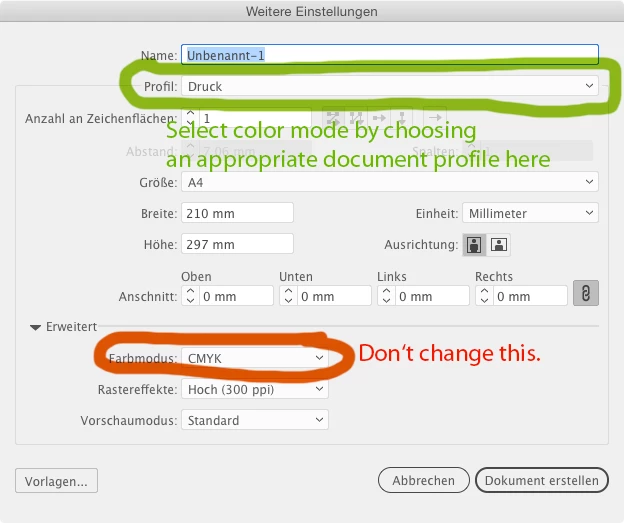
As for the color mode and the document profile (and just to get this right: the Color mode sometimes in RGB and sometimes is CMYK, but whatever it is, don't change it there. When you need a different color mode, select a different document profile):

When you convert an RGB file to CMYK, bright colors will almost always look differently. Additive color works completely different than subtractive color. When starting your logo project in CMYK you will have much better luck in getting consistent color, because it's the smaller color space.

You might want to have a look at this short introduction:

Set up a file: vector or raster, resolution, color mode and file format

1 reply

Monika Gause
Community Expert
Community Expert
July 25, 2017

see if this helps Error: "Suite Color Management is not enabled" | Adobe Bridge CS3, CS4, CS5  with the Bridge.

As for the document profile warning: it' s a bad idea to change color modes after having chosen a document profile. If you want a web document, select a web document profile. I mean you can of course just ignore thw warning and just go ahead, but you would need to correct all your swatches or brushes or symbols. That's all the warning tells you. It's not primarily about color management.

When saving that logo to PDF you might have converted it's color mode fromRGB to CMYK, which of course makes it muddy compared to the original RGB. Please learn about color modes and printing.

toniak64353278
Participant
July 25, 2017

Hi Monika, thanks for your reply,

Unfortunately I tried your troubleshoot link. Points one and two didn't work. When I tried to find the colour cache folder, i went to

Mac/library/Caches but the following was in my caches folder? Can you help from here?

Regarding your second point, the document colour mode warning comes up before you've chosen a profile, so the default setting when you open a new document. It goes away if you choose web RGB or Print CMYK document. I do understand colour modes and printing, most of it I think but whenever I used to save an RGB PNG or a CMYK EPS file the colour remained the same, (so I thought). Or is this correct what is happening and I am incorrect?

So what I am saying is... is it expected that when I save a CMYK as an EPS compared to the same file RGB as a PNG file, the colour will be seen differently on the screen? I am doing a logo and he was after an EPS and a PNG. So does he just have to expect colour differences. Sorry if I'm sounding confused, I should know this stuff but I'm having a moment.

Cheers

Tonia

Monika Gause
Community Expert
Monika GauseCommunity ExpertCorrect answer
Community Expert
July 25, 2017

Sorry I can't help you with Bridge. Please try the Bridge forum for help:

Bridge General Discussion

As for the color mode and the document profile (and just to get this right: the Color mode sometimes in RGB and sometimes is CMYK, but whatever it is, don't change it there. When you need a different color mode, select a different document profile):

When you convert an RGB file to CMYK, bright colors will almost always look differently. Additive color works completely different than subtractive color. When starting your logo project in CMYK you will have much better luck in getting consistent color, because it's the smaller color space.

You might want to have a look at this short introduction:

Set up a file: vector or raster, resolution, color mode and file format