


SVG Export only visible layers
I'm back! I was never leaving haha.
So I am trying to export an svg file for only the visible layer. I am able to do this manually by
Export as SVG, use artboards, and these options
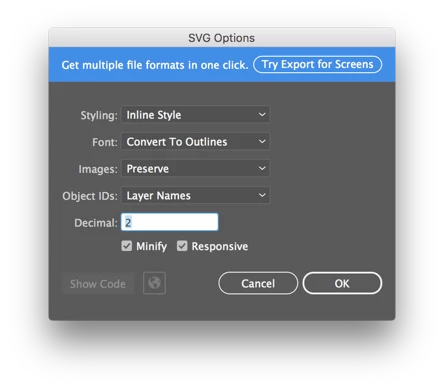
When I do it this way, it only saves the visible layer. However, when I use the code below, it saves all the layers even hidden ones, and all the raster images involved.
var docRef = app.activeDocument;
var path = docRef.path;
function exportFileToSVG (dest) {
if ( app.documents.length > 0 ) {
var exportOptions = new ExportOptionsSVG();
var type = ExportType.SVG;
var fileSpec = new File(dest);
exportOptions.saveMultipleArtboards = true;
exportOptions.coordinatePrecision = 2;
exportOptions.fontType = SVGFontType.OUTLINEFONT;
exportOptions.embedRasterImages = false;
exportOptions.includeFileInfo = false;
exportOptions.preserveEditability = false;
app.activeDocument.exportFile( fileSpec, type, exportOptions );
}
}
exportFileToSVG('~/Desktop/blah');
If anyone has any idea why all the layers are saving and not just the visible ones, please let me know. I can always create an action by how I saved it and then run the action through the full script, but I was hoping to script everything. Thanks!!
 AdChoices