scottr12917177
Inspiring
March 10, 2016
Question

SVG, exporting paths on artboard?

  • March 10, 2016
  • 1 reply
  • 793 views

EXAMPLE:

The groups bounding box overlaps the artboard, and those shapes will get exported into the SVG.
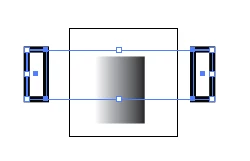
<rect class="cls-1" x="11.79" y="1.71" width="8.38" height="11.13"/>

<rect class="cls-2" x="0.5" y="0.5" width="3.21" height="8.29"/>

<rect class="cls-2" x="28.21" y="0.5" width="3.21" height="8.29"/>

I have noticed that using "Export..." will grab paths of grouped items whose bounding boxes overlap an artboard. I can select all paths on each artboard through script, but unsure if there is a way to call the "Export Selection" on these paths as SVG through script?

I have seen suggestions to hide-and-unhide paths to exclude them from the SVG export, but that seems dirty... and I will be batching over 10,000 artboards, and prefer a cleaner solution... if such solution exists?

Thanks!

scott

This topic has been closed for replies.

1 reply

Silly-V
Legend
March 10, 2016

Maybe, re-name the outlying items (with script) and then make sure to export with a setting that would keep those names. Then after 10,000 items are done, go through them with a text-editing script which strips out the tags which have the flagged id attributes?

Qwertyfly___
Legend
March 10, 2016

I like this Idea. create 1 svg with everything.

then strip what you don't want.
processing a text file 10,000 times will be much quicker then using illustrator to export svg 10,000 times!

even if you use javascript from within illustrator to do that editing of the text file.

Silly-V
Legend
March 10, 2016

Hey, do you know how it works with web browsers downloads? I think it could even be done by leveraging the use of a browser since jquery and stuff make it easy to do so, but I would not know how one would be able to 'download' the resulting text other than saving the entire processed page source - as one file, at which point now we're back to having to use something extra to parse that text..