
karth80472045
Inspiring
February 2, 2018
Answered

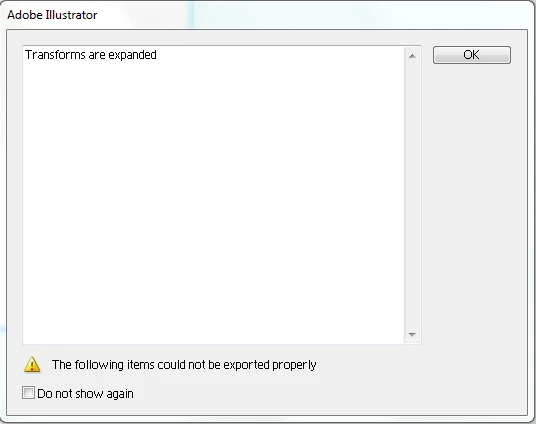
Svg File Transforms are Expanded Dialog box

  • February 2, 2018
  • 1 reply
  • 4065 views

Hello all,

SVG file during code execution i am getting dialog box Svg file Transforms are expanded i would like to close this popup through code it is possible

Please help me.
Code :

var exportOptions = new ExportOptionsSVG();

var type = ExportType.SVG;

var fileSpec = new File(sourceDoc.path);

exportOptions.embedRasterImages = true;

exportOptions.embedAllFonts = false;

exportOptions.fontSubsetting = SVGFontSubsetting.None;

exportOptions.preserveEditability = true;

exportOptions.fontType=SVGFontType.SVGFONT;

sourceDoc.exportFile( fileSpec, type, exportOptions );

sourceDoc.close ();

This topic has been closed for replies.
Correct answer Silly-V

There may be a preferences key for this.

/svgOptionDlg {

/O_Width_Unit 2

/O_Height_Unit 2

/O_Resolution_Unit 0

/O_Anti_Alias_Artwork 1

/O_ExportHiddenObjects 0

/O_Export_LayerAsTitle 0

/O_Also_Export_Compressed 0

/O_Constrain_Proportions 1

/O_Clip_To_Artboard 0

/O_EmbedFontFormats 2

/O_EmbedRasterLoc 2

/O_RasterResolution 72

/O_GradientTolerance 0.25

/O_TextOnPath 1

/O_RoundTrip 0

/O_IncludeAdobeNameSpace 0

/O_IncludeTemplate 0

/O_IncludePGF 0

/O_IncludeXAP 0

/O_IncludeSlices 0

/O_DialogExpanded 0

/O_SVGDTD 0

/O_SVFontType 1

/O_DisbleAutoKerning 1

/O_UseSVGTextOnPath 1

/O_IncludeUnusedStyles 0

/O_ResponsiveSVG 1

}

Go to your "Adobe Illustrator Prefs" file in your User > AppData > Roaming folder on Windows, or User > Library (have to hold option key then, the Library item appears in the "Go" menu of Finder) > Preferences > Adobe Illustrator 22 Settings

If your /O_DialogExpanded 0 line shows a 1 instead of 0, (assuming you never checked the "do not show again" checkbox), then this could be the preference.

If so, then you can try to see if the preference key works:

app.preferences.setIntegerPreference("/plugin/O_DialogExpanded", 0);

1 reply

Silly-V
Silly-VCorrect answer
Legend
February 3, 2018

There may be a preferences key for this.

/svgOptionDlg {

/O_Width_Unit 2

/O_Height_Unit 2

/O_Resolution_Unit 0

/O_Anti_Alias_Artwork 1

/O_ExportHiddenObjects 0

/O_Export_LayerAsTitle 0

/O_Also_Export_Compressed 0

/O_Constrain_Proportions 1

/O_Clip_To_Artboard 0

/O_EmbedFontFormats 2

/O_EmbedRasterLoc 2

/O_RasterResolution 72

/O_GradientTolerance 0.25

/O_TextOnPath 1

/O_RoundTrip 0

/O_IncludeAdobeNameSpace 0

/O_IncludeTemplate 0

/O_IncludePGF 0

/O_IncludeXAP 0

/O_IncludeSlices 0

/O_DialogExpanded 0

/O_SVGDTD 0

/O_SVFontType 1

/O_DisbleAutoKerning 1

/O_UseSVGTextOnPath 1

/O_IncludeUnusedStyles 0

/O_ResponsiveSVG 1

}

Go to your "Adobe Illustrator Prefs" file in your User > AppData > Roaming folder on Windows, or User > Library (have to hold option key then, the Library item appears in the "Go" menu of Finder) > Preferences > Adobe Illustrator 22 Settings

If your /O_DialogExpanded 0 line shows a 1 instead of 0, (assuming you never checked the "do not show again" checkbox), then this could be the preference.

If so, then you can try to see if the preference key works:

app.preferences.setIntegerPreference("/plugin/O_DialogExpanded", 0);

karth80472045
Inspiring
February 4, 2018

hello sir,

Manual method is ok , but through code snippet is possible .