Participant
August 24, 2022
Answered

SVG file trasparency glitch

  • August 24, 2022
  • 3 replies
  • 829 views

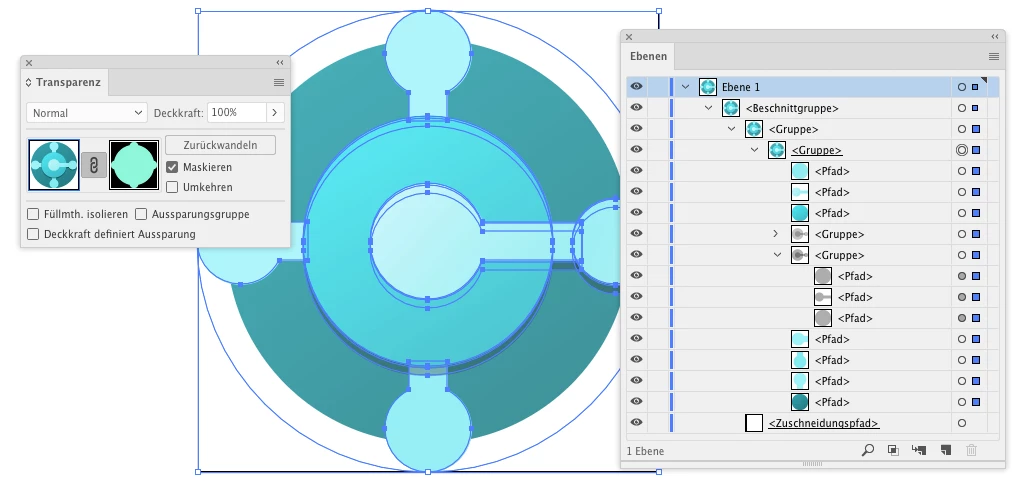
I'm having issues with some SVG files. Here's the link to an easy way to download the SVGs, here's the official Microsoft link where you get them all at once, they're Microsoft application icons. Initially I just tried dragging and dropping them into the .ppt file I needed them in, but they looked partially transparent when doing this. So I opened them in Illustrator thinking I could just mess with the transparency settings but everything was 100% opacity, also when opening in illustrator I got this error message:

"Clipping will be lost on roundtrip to Tiny"

And once I clicked ok all the dropshadows were messed up because I guess they were clipping masks.

Not sure how to fix this
This topic has been closed for replies.
Correct answer Monika Gause

Check them out in the Layers panel. Watch out for the underlines. There are opacity masks applied.


3 replies

Anubhav M
Community Manager
Community Manager
August 24, 2022

Hello Tyler218906979p97,


Sorry to hear about this experience. I hope the suggestions shared by Mylenium helped resolve the problem. If not, kindly contact Microsoft Support for further assistance https://answers.microsoft.com/en-us/msoffice/ and check if it helps.


Looking forward to your response.


Thanks,

Anubhav

Mylenium
Legend
August 24, 2022

The appearances are all created with "filters", so they need to be converted. That's inherent in how this stuff works. that aisde I concur with Monika. whatever issues you have in PPT likely don't have anything to do with the files themselves. I'd start by checking whether the Insert --> Graphic or Edit --> Object/ Graphic panel has not mis-rembered some settings from a previous image or you're not applying a default custom object style.


Mylenium

Participant
August 24, 2022

It's definitely an illustrator issue because when i open the files in illustrator all the shading is messed up and the transparency issue is present, screenshot above, I've tried placing the svg in another illustrator file and the glitches persist, I've tried opening the svg in browser and then saving it as a PDF (found that suggested on another thread), and a bunch of other fixes that didn't work for me 😞

Monika Gause
Community Expert
Community Expert
August 24, 2022

Looks like you have an issue with Power Point, not with Illustrator.

Participant
August 24, 2022

It's definitely an issue with the file itself because the transparency issue happens in illustrator too, screenshot attached

Monika Gause
Community Expert
Monika GauseCommunity ExpertCorrect answer
Community Expert
August 25, 2022

Check them out in the Layers panel. Watch out for the underlines. There are opacity masks applied.