


December 3, 2025
Question

SVG Image Misalignment After Opening in Browser

  • December 3, 2025
  • 1 reply
  • 354 views

Hi,


I created a harness illustration in Adobe Illustrator with callout numbers on one layer and harness images on another. After saving the file in SVG format, the images appear moved or shrunk when I open it in Google Chrome, causing misalignment between the callouts and the harness images.
How can I ensure that the images do not deform or shift when viewed in a browser?
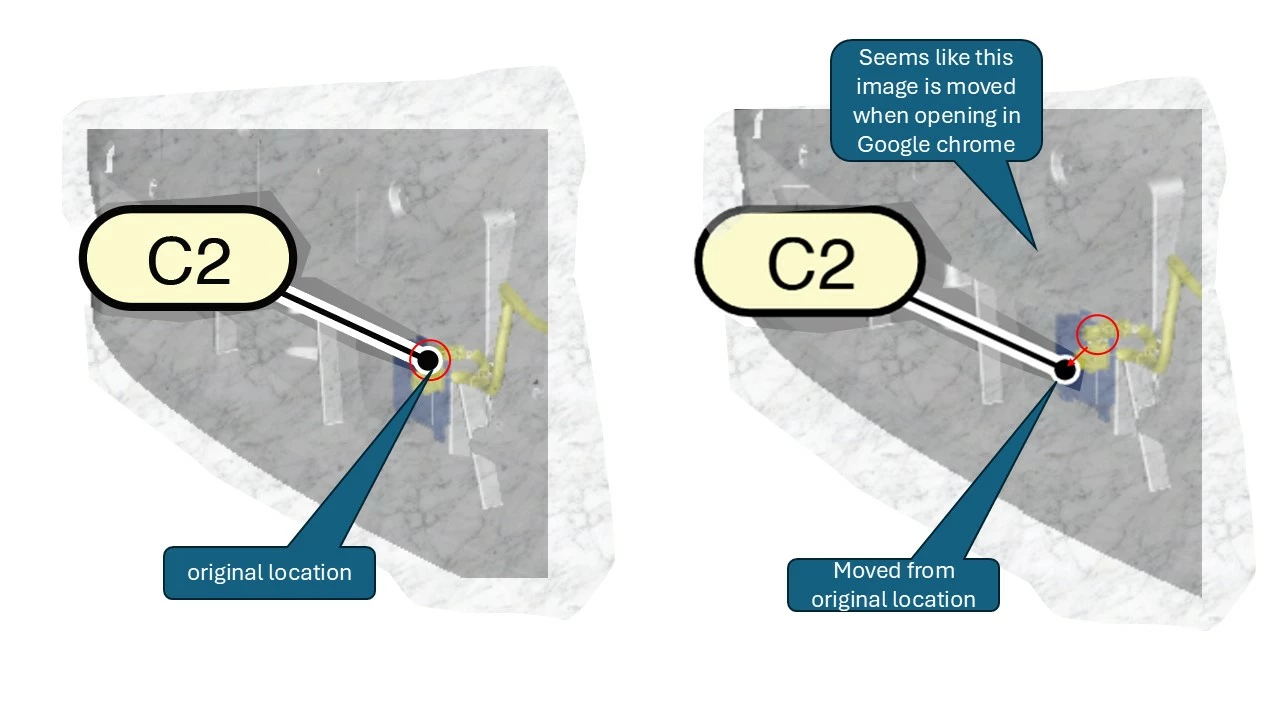


Give below image for better understanding. Let me know for any more clarity.


THanks,

Arul

1 reply

Community Expert
December 3, 2025

Hi Arul,

I don't know if this will help in this situation but I have had issues with SVG being accurate in the past, adding extra points or tiny adjustments (which usually occurred if I exported using the asset export). If you export using File>Export As>SVG you can adjust the 'Decimal setting' and increase it to a higher number like 3, 5, or even 7 (which appears to be the max). 

Hope this is of some use.

Kind regards,

Paul

arul_9657Author
December 8, 2025

Hi Paul,

Thanks for your reply. We followed your guidance and tested Decimal values from 1 to 10, but unfortunately it didn’t solve the issue.
We also tried different settings, including checking and unchecking the Responsive option and switching between the SVG profiles SVG 1.0 and SVG 1.1.

However, none of these changes resolved the problem.

One key observation is that the image appears to shrink slightly on the left-hand side & Right Hand side (Towards inside), rather than uniformly from the centre.

Please let us know if there’s anything else we can try.


Regards,

Arul D

Community Expert
December 8, 2025

Hi Arul,

Thanks for testing those options. Based on the behaviour you’re seeing, the issue is very likely due to the harness being a raster image placed inside an SVG. SVG is primarily a vector format, and when a bitmap image is embedded, browsers like Chrome can interpret its transform and bounding box slightly differently. This often causes the image to shift or shrink from one side rather than scale uniformly, which matches the symptoms you’ve described.


To prevent this, the goal is to make the SVG as 'pure vector' as possible and remove any hidden transforms Illustrator adds. Here are a few steps that usually solve it:

1. Before exporting

  • Select All

  • Object → Expand Appearance

  • Object → Flatten Transparency (High Resolution, Preserve Appearance ticked)

This removes hidden transform and mask data that Chrome tends to interpret differently.


2. In the SVG options

  • Responsive: OFF

  • Images: Embed

  • Decimal places: 4–6 (you can type into the box)

  • Styling: Internal CSS is fine

When a raster image remains inside an SVG, browsers often shift it by a small amount. Embedding it and removing the transforms normally solves the alignment issue. SVG gives the best results when everything in the file is vector, so if the harness artwork can eventually be converted to vectors, that would make it completely reliable in all browsers.

Let us know how you get on.


Kind regards,
Paul