Participant
January 19, 2018
Question

Swatch Options - CMYK to Book Color

  • January 19, 2018
  • 5 replies
  • 636 views

Hey guys,

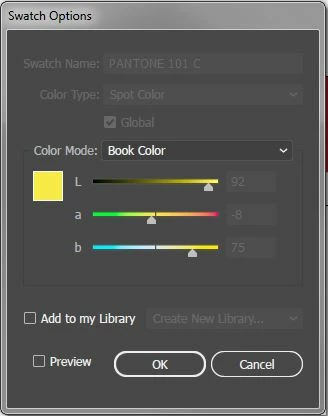
When using Pantone+ Solid Coated colors in Illustrator, the default way is set color mode to "CMYK" as shown in picture one.  Is this possible to change the default to be "Book Color" as shown in picture two?  I need all of my pantones to export in the seperations for my rip software, but its a paint to go through and do this on every job for every pantone color used....

(Ignore them being two different pantones please)

Thanks guys!

    This topic has been closed for replies.

    5 replies

    Ton Frederiks
    Community Expert
    Community Expert
    January 21, 2018

    Which Illustrator version are you using?

    The default in most recent versions is Book Color.

    Omar.Fathy
    Community Expert
    Community Expert
    January 21, 2018

    You can using the color book library it will be more easy to choose, search and find your Color from Color Book.

    Bill Silbert
    Community Expert
    Community Expert
    January 21, 2018

    Once you choose a color book use its pull-down menu found on the top right of the panel and choose “persistent“. Then that color book will be open whoever you launch Illustrator.

    Legend
    January 21, 2018

    It would be possible for a moderator to do it. Tell you what, I'm going to try an experiment. I'm going to "mark for abuse" your post. Don't be alarmed, they should read the report, clear the flag, and move the post. Well, it's worth a shot!

    Peru Bob
    Community Expert
    Community Expert
    January 21, 2018

    Moved to the Illustrator Forum.

    Participant
    January 21, 2018

    Is it possible to move to the illustrator forum? !

    Legend
    January 21, 2018

    While this forum is good for colour management discussions, I think you will find a lot more people who might answer in the Illustrator forum. Good luck!