
Participant
December 6, 2024
Answered

T-Shirt-Design with different line heights and font sizes

  • December 6, 2024
  • 2 replies
  • 360 views

Hello!


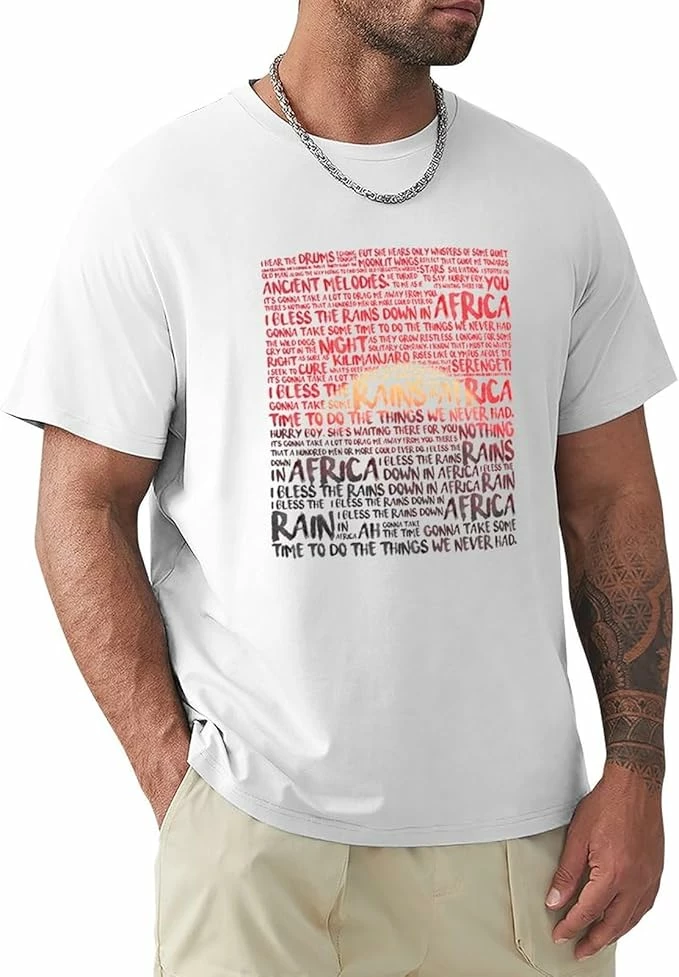
I’m curious about how to create a T-shirt design like the one in the photo. The gradient or sunset overlay isn’t my issue, but rather how some words are written larger, and then directly next to them, a few smaller words are in two lines.

Do I need to use hundreds of individual text boxes and adjust them manually, or does anyone have an idea on how this could be done more easily?


Thanks a lot for your help!
 

This topic has been closed for replies.
Correct answer Monika Gause

You could serch for online tools to create word clouds or tag clouds

But basically: yes, make single point text objects.

There is a script that can make a much simpler result:

https://gist.github.com/creold/4a6f3c4ad0174d9ad5f6463ba5c47696

2 replies

Kurt Gold
Community Expert
Community Expert
December 7, 2024

I'm not sure if it is a good idea to do this with word cloud applications. As far as I can see, your example mainly shows continuous and supposedly meaningful sentences, not just a crowd of random words.


Probably it is just deliberate manual work with point type or area type.


As for the different font sizes, you may want to take a look at Illustrator's Touch Type tool. It's fun, but it may wreak havoc at the same time.


And for the two-line or three-line sections here and there, you may have a look at Warichu in the Character palette menu (you may first have to turn on East Asian options in the application preferences to get Warichu).

Monika Gause
Community Expert
Monika GauseCommunity ExpertCorrect answer
Community Expert
December 6, 2024

You could serch for online tools to create word clouds or tag clouds

But basically: yes, make single point text objects.

There is a script that can make a much simpler result:

https://gist.github.com/creold/4a6f3c4ad0174d9ad5f6463ba5c47696