

MahaB82A
October 3, 2025
Answered

Temporary tools appear in drop-down menu

  • October 3, 2025
  • 3 replies
  • 261 views

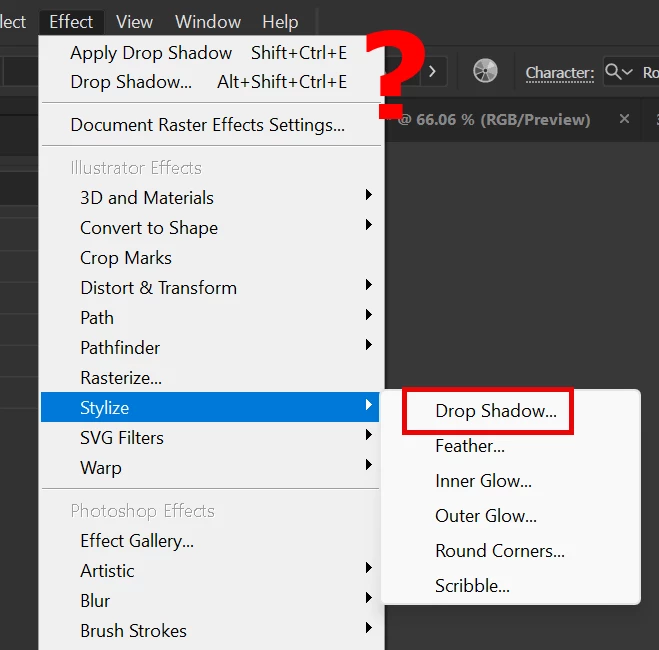
I assume at the top tool option is there to have a easy access to use the same tool again & again. What is purpose of having two times? 


Correct answer Kurt Gold

I'm afraid you are confusing some things, Abhishek.


- The "Apply" (Drop Shadow) command at the top of the Effect menu is a varying quick access command to immediately apply the last used effect with exactly the same last used settings.


- The "Drop Shadow ..." command below the "Apply" command also remembers the last used settings, but it additionaly opens the modal dialog of the corresponding effect (in case the user wants to set some different parameters).


- The Effect menu > Stylize > Drop Shadow ... command basically opens the Drop Shadow modal dialog with the default settings.


By the way, the Drop Shadow effect is always a raster effect, unless you set the Blur to 0 (zero).

3 replies

MahaB82A
MahaB82AAuthor
October 4, 2025

Thanks for all.

MahaB82A
MahaB82AAuthor
October 4, 2025

Thanks

Monika Gause
Community Expert
Community Expert
October 3, 2025

At the top there will always be the last used effect.

In the Stylize menu is the place where it belongs.


It it not a vector based effect. It creates pixels.

Abhishek Rao
Community Manager
Community Manager
October 3, 2025

Hi @MahaB82A,


That’s a great question. Illustrator lists Drop Shadow in two places because they work differently. The one under Stylize is an Illustrator effect, which means it's vector-based, stays fully editable, and remains resolution independent inside Illustrator. The one at the top is a Photoshop effect, which is raster-based and renders differently, especially when exporting or printing. While both can look similar, the choice depends on whether you want resolution-independent results or a rasterized effect.


I'll also leave this open for our experts to share more insights from their workflows.

Abhishek

Kurt Gold
Community Expert
Kurt GoldCommunity ExpertCorrect answer
Community Expert
October 3, 2025

I'm afraid you are confusing some things, Abhishek.


- The "Apply" (Drop Shadow) command at the top of the Effect menu is a varying quick access command to immediately apply the last used effect with exactly the same last used settings.


- The "Drop Shadow ..." command below the "Apply" command also remembers the last used settings, but it additionaly opens the modal dialog of the corresponding effect (in case the user wants to set some different parameters).


- The Effect menu > Stylize > Drop Shadow ... command basically opens the Drop Shadow modal dialog with the default settings.


By the way, the Drop Shadow effect is always a raster effect, unless you set the Blur to 0 (zero).
