

tylerlwhite
Participating Frequently
November 15, 2019
Question

Terrible image quality, large file size

  • November 15, 2019
  • 2 replies
  • 271 views

Hello!


How do you export images with small file sizes while maintaining decent image quality?


Here is an example of my situation: 
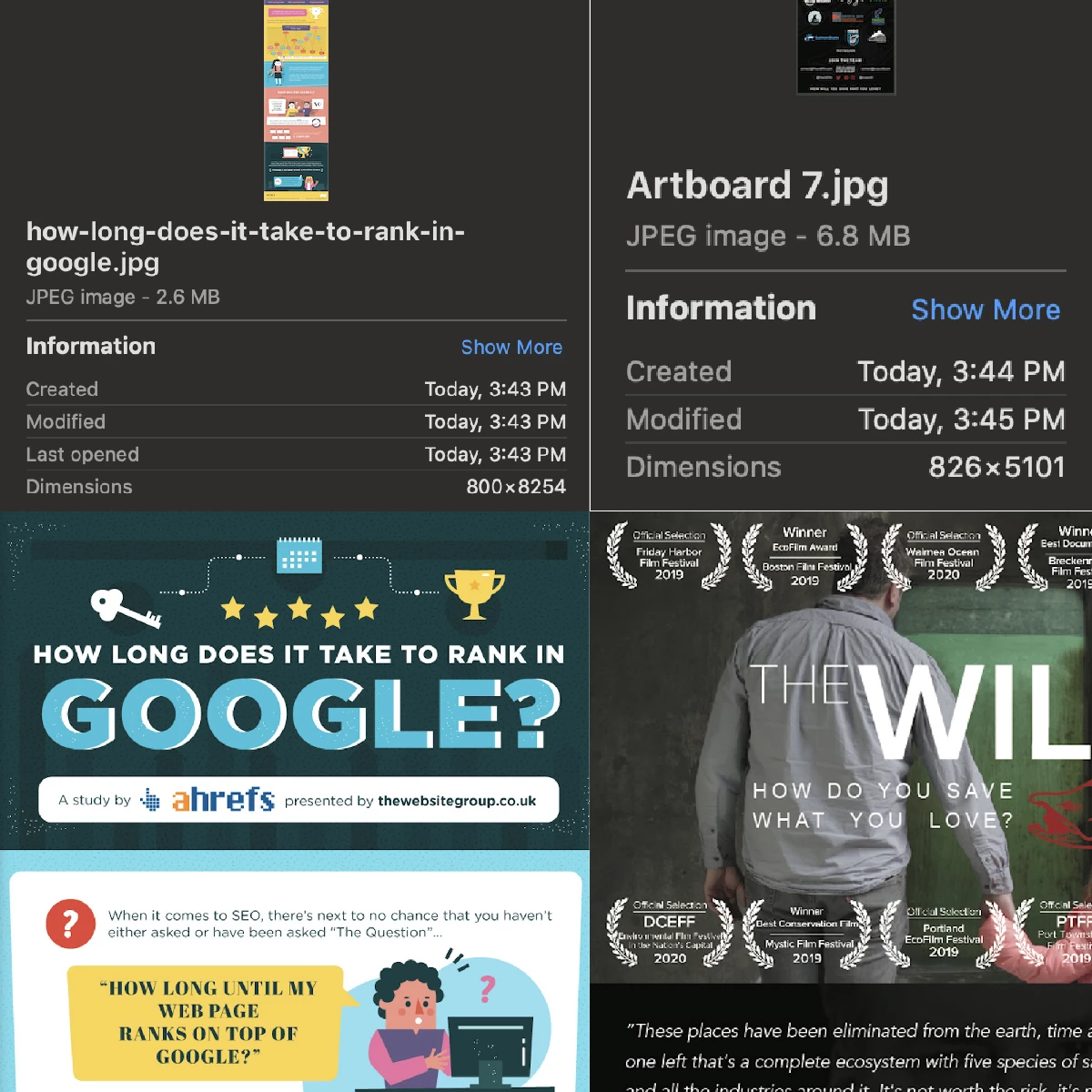
 

I pulled the infographic on the left from the internet and the infographic on the right I exported from illustrator (JPEG @ 72ppi). The web image is larger than mine and only 2.6mb while mine is 6.8mb.


No matter what I try (ImageOptim included) I can't get my file anywhere close to that size without making the text unreadable.


What am I missing?


Here are the two files: https://imgur.com/a/AMbflQQ


Thank you so much,

L

This topic has been closed for replies.

2 replies

Legend
November 15, 2019

If yu have text, use PNG better than JPG, usually it works. You can also try to export as SVG.

Legend
November 15, 2019

The two designs aren't at all comparable. They are just not even slightly similar (except for being infographics).

On the left, solid colour and a few simple shapes.

On the right, a photo. 

So, get the size without the photo. Then see how much detail you can add back in. But full-design photography is something you do for print, not for optimized web graphics.