scottg64756296
Participant
April 7, 2018
Answered

Text and shape curves are always distorted, am I doing something wrong?

  • April 7, 2018
  • 2 replies
  • 959 views

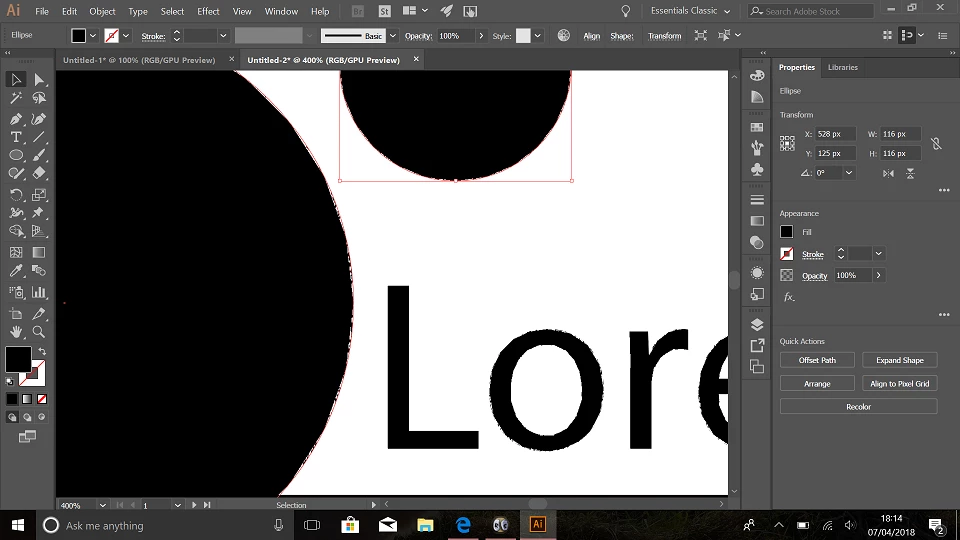
So I don't know much about Illustrator apart from it makes vectors, which is good for web and print. My problem is whenever I make text and shapes with a curve in them the fill becomes distorted when zoomed or enlarged.

I'm thinking I'm doing something wrong or whatever, cant find a solution online anywhere, so I'm asking here. I've attached a print screen of some text and shapes zoomed in. What am I doing wrong?

This topic has been closed for replies.
Correct answer Jacob Bugge

Scott,

Ctrl/Cmd+E.

This toggles between GPU and CPU Preview, GPU causing the issue.

This is what GPU is about:

https://helpx.adobe.com/illustrator/kb/gpu-performance-preview-improvements.html

2 replies

scottg64756296
Participant
April 7, 2018

Thank you, that fixed everything! I knew it must be something simple like that, thanks for your quick reply

Jacob Bugge
Community Expert
Community Expert
April 7, 2018

You are welcome, Scott.

Graphics cards have been included in the system requirements:

https://helpx.adobe.com/illustrator/system-requirements.html

Apart from an inadequate card, the issue can be caused by lack of driver updating, lack of proper recognition of the card by the computer, and whatnot.

Jacob Bugge
Community Expert
Jacob BuggeCommunity ExpertCorrect answer
Community Expert
April 7, 2018

Scott,

Ctrl/Cmd+E.

This toggles between GPU and CPU Preview, GPU causing the issue.

This is what GPU is about:

https://helpx.adobe.com/illustrator/kb/gpu-performance-preview-improvements.html