Participant
March 22, 2018
Answered

Text Box Issue

  • March 22, 2018
  • 8 replies
  • 1202 views

I am creating a business card in Illustrator CC and when I place a text box with text the text is outside of the box a little bit. I am not sure what I may have done.
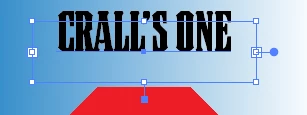
Any help is greatly appreciated.

Thanks

Mark

    This topic has been closed for replies.
    Correct answer Doug A Roberts

    https://forums.adobe.com/people/Barbara+Ash  wrote

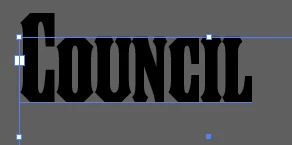
    The issue is with the font. When capital letters are typed they go beyond the box. Lower case stay within the box.

    i don't think this is an 'issue'. it's just by default first baseline is usually set to Ascent, and since it's a caps font the ascenders sit at the same height as every other character. Set the baseline to Em box or Leading or whatever you need.

    8 replies

    Participant
    March 23, 2018

    Thanks everyone for their replies. I greatly appreciate all the help. I will look for a new font style.

    Thanks

    Mark

    creativejake
    Participating Frequently
    March 22, 2018

    I have found that all of the Adobe Creative Cloud applications tends to get a bit quirky if I haven't restarted it for a while. Have you Quit Illustrator and restarted it by chance?

    Participant
    March 22, 2018

    I am such a dork. Sorry. Hope this is better.

    Thanks again.

    Mark

    Participant
    March 22, 2018

    Attached is the screen. I have not tried different fonts yet. The font I am using came from Adobe Font Typekit , I think that is what it is called. I am new to Illustrator CC and am learning it as I go.

    Again any help is greatly appreciated.

    Thanks

    Mark

    barbara_a7746676
    Community Expert
    Community Expert
    March 22, 2018

    A screen capture with the text selected would be helpful.

    creativejake
    Participating Frequently
    March 22, 2018

    I agree with Barbara, however, I sometimes find some typefaces do this depending on where you have purchased / downloaded them. Does this act the same with Myriad Pro or another default OS font? Just curious.

    barbara_a7746676
    Community Expert
    Community Expert
    March 22, 2018

    This is less likely, but Area Type Options may be set to First Baseline: x Height.

    barbara_a7746676
    Community Expert
    Community Expert
    March 22, 2018

    Highlight the text and make sure that Baseline Shift is set to zero.

    Monika Gause
    Community Expert
    Community Expert
    March 22, 2018

    Please show us the Characters panel and the Appaearance panel.