
Participant
October 10, 2023
Question

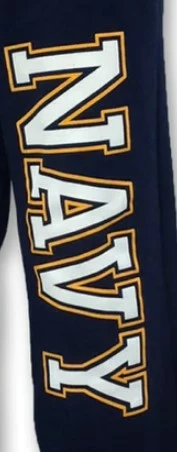
Text effect block outline around text

  • October 10, 2023
  • 1 reply
  • 223 views

I'm so sorry for asking what is probably super easy but I can't figure it out.  Which is frustrating to me.  I have a request to print the words LIONS on sweat pants (school spiritwear) and they want text effect shown in the attached picture.  It is a simple letter with a block outline that is separated from the letter itself.  Can someone help?   Thanks in advance
This topic has been closed for replies.

1 reply

Monika Gause
Community Expert
Community Expert
October 10, 2023

Select the text with the selection tool (do not double click to select the characters, just select the text object). Delete the exstining stroke (if any)

Apply a new stroke via the Appearance panel.

Apply the effect > Path > Offset path to just that stroke.


Depending on the printing method you might need to expand appearance and outline strokes and text.

Participant
October 10, 2023
Thank you so much!!!
Monika Gause
Community Expert
Community Expert
October 10, 2023

Glad you could solve it!