Participant
August 3, 2023
Question

Text Effects

  • August 3, 2023
  • 1 reply
  • 229 views


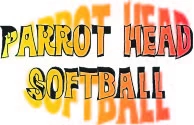
Something simple I am sure, what am I missing here?  I only want the text effects NOT the original black text behind it?  
 

This topic has been closed for replies.

1 reply

Monika Gause
Community Expert
Community Expert
August 3, 2023

Is that something you have created in Illustrator? the quality doesn't look like a screenshot.

And if so, please select it and show ius the appearance panel. Maybe you have applied the effect in the wrong place.

Participant
August 3, 2023
Yes I made this in Illustrator, this is just a snip of it in Illustrator. I have been using AI for a few years, this is new computer, new download of AI, and stuck on this one little thing
This message, including any attachments, constitutes an electronic communication within the meaning of the Electronic Communications Privacy Act, 18 U.S.C. Section 2510. This message is the Confidential property of Low T Centers, LLC and Low T Physician Services, PLLC, and disclosure is strictly limited to only those recipients intended by the sender. In addition, since this message may contain confidential, private, proprietary, or otherwise privileged information, the dissemination or forwarding of this message to recipients other than those intended by the sender is STRICTLY PROHIBITED, and the sender does not consent to any notice from the recipients to the contrary. If you have received this communication in error, please notify the sender immediately by return e-mail and delete this message entirely from your system.
Monika Gause
Community Expert
Community Expert
August 3, 2023

Can you please turn off the privacy message in your email and post the Appearance panel? Or just try and analyze it yourself. https://youtu.be/zXvRbN03MzQ