
Participant
March 25, 2024
Answered

Text I type is exiting the text bounding box in certain parts,

  • March 25, 2024
  • 2 replies
  • 701 views

I dont know why, but some text i type is exiting the text bounding box in certain parts, to the left and onto, making it look weird and not ordered in some parts. Is it a problem with the font, or am i doing something wrong? 


The font is : URW DIN Cond

Illustrator : V 28.3

This topic has been closed for replies.
Correct answer Doug A Roberts

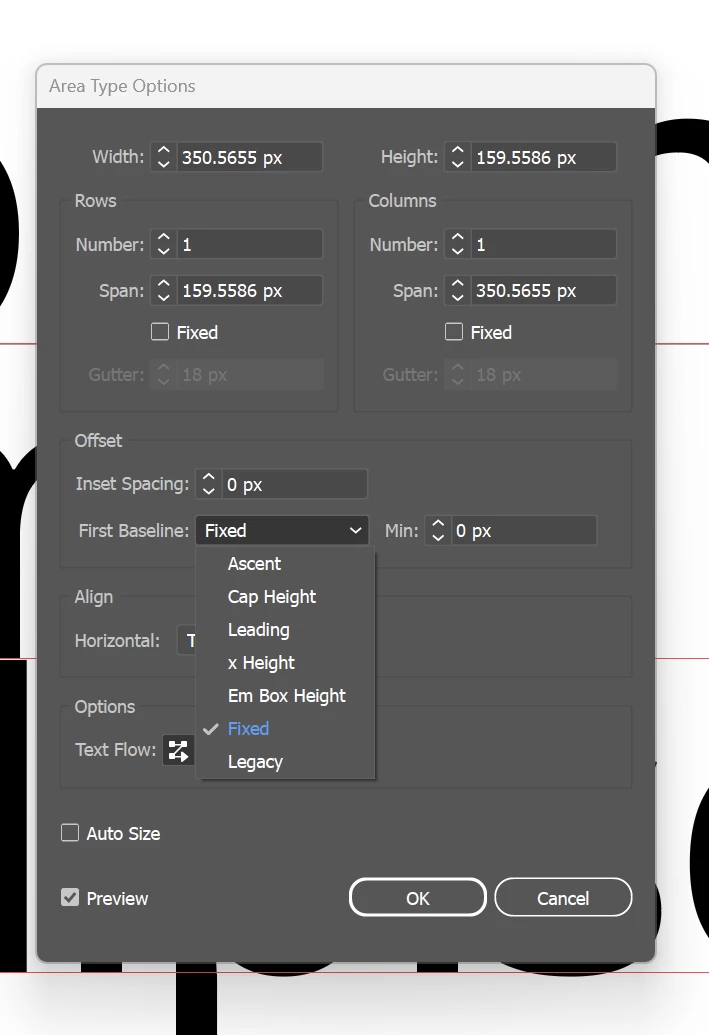
If, for example, your first baseline is set to Cap Height and ascenders in your particular font exceed the cap height, parts of certain letters will overlap the bounding box. Or you could set the first baseline to a fixed value of less than the em box size and have any amount of the first line arbitrarily overlapping the bounding box.
 

2 replies

Monika Gause
Community Expert
Community Expert
March 25, 2024

The overlaps on top and bottom could be actually built into the font.

The same goes for the left. But that one is a good thing: it accounts for visual alignment of certain letters.

You could also check if "Optical margin alignment" is turned on in the Type menu.

Doug A Roberts
Community Expert
Doug A RobertsCommunity ExpertCorrect answer
Community Expert
March 25, 2024

If, for example, your first baseline is set to Cap Height and ascenders in your particular font exceed the cap height, parts of certain letters will overlap the bounding box. Or you could set the first baseline to a fixed value of less than the em box size and have any amount of the first line arbitrarily overlapping the bounding box.