


Participant
May 9, 2017
Question

Text Import options

  • May 9, 2017
  • 3 replies
  • 4281 views

Hi,

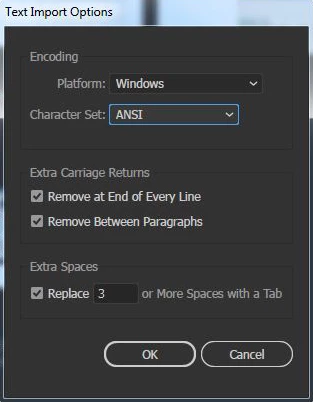
I am a designer and I have been working on a project. Recently one of my files got corrupted and the reason is still unknown. Whenever I open that file it shows a pop up dialog box Text import options.

I have attached a screenshot here with for your reference. The file is of extreme priority and recreating the file would kill more time. Expecting a quick and a positive response.
    3 replies

    Participant
    April 2, 2018

    Any updates here? Have several important files with the same issue.

    KShinabery212
    Community Expert
    Community Expert
    May 9, 2017

    Have you tried opening up the file on another computer with Illustrator?

    If not then it might be gone.  I have had this happen different times when I was working from a Western Digital external hard drive.  Needless to say I never use WD anymore... Seagate all the way!

    But that is off topic.  It can be annoying.  But even in Microsoft Word... if you are working on an important project it is good to save a backup or rename it to a different file after so much work.  Example.... Birdv1.ai..... then after working a few hours Birdv2.ai.

    I know that is a silly way to do it.  But sometimes I do that... just so I have a point that I can always go back to.  Kind of like gaming... you want to keep one point of the game saved.  Just save the next part of the game under a new name.

    Bad thing is this can happen in any software at any moment.  That is the pain of creating things digitally.  You have to save or back things up under a new name.  Happens to even the pros... they forget and then they have that "Oh NOOOOO" moment.

    So if it does not open up on another computer... you may very well have to recreate it all.

    Let's connect on LinkedIn. https://www.linkedin.com/in/kshinabery/
    Monika Gause
    Community Expert
    Community Expert
    May 9, 2017

    If the file is of extreme priority then why is there no backup?

    Most probably the file is doomed.

    Did you already try and restart your computer? Sometimes this solves various issues.

    Did you save with PDF compatibility? In that case: Create a new Illustrator file and File > Place the corrupt file.

    Did you save directly to a server? Open directly from a server?

    That might be the cause of your issue.