
jeffreyw53399910
Participant
October 2, 2017
Answered

Text in all my files is squished/distorted upon opening

  • October 2, 2017
  • 3 replies
  • 4790 views

Just started happening today at my office - coworkers are not having the same issues with their versions of the program while opening the same files. Every file I open has squished text and I get this message when I try to edit it.
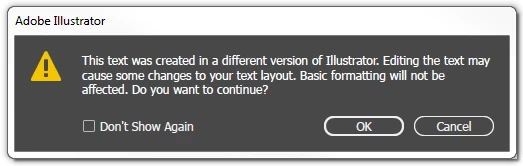
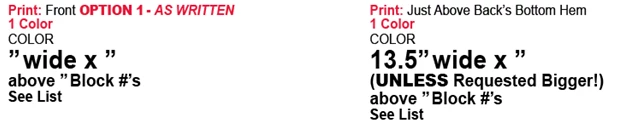
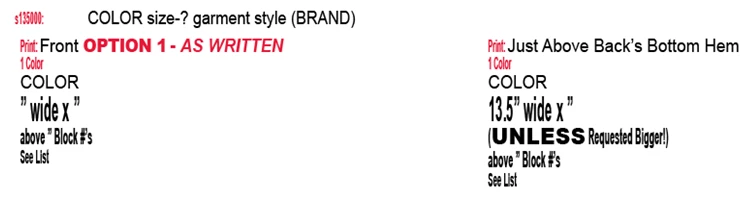
I know this isn't true because I just created some of these files before the weekend. As far as I know there weren't any automatic updates. I've tried updating my program manually through the desktop app and I've restarted both my computer and the program a couple times but the issue persists. This is an example of how the text should appear vs how it's opening on my computer.
This topic has been closed for replies.
Correct answer jeffreyw53399910

Can you install a different version of Arial Bold on your system and use that instead of the system version?


Figured it out! Very obscure issue... turns out it's related to a font I downloaded last week called "Antenna Bold" (which wasn't at all what I was looking for). Found the answer on this forum:

[SOLVED] Adobe Illustrator Arial Font Issue - Spiceworks

So I deleted that font and everything work perfectly now. Thanks for the help otherwise.

3 replies

jeffreyw53399910
Participant
October 2, 2017

Thanks for the responses. My files were created in CC 2017 but we save all of our files to be compatible with CS6. I'm not using a font manager, and yes all of my text is active.

Bill Silbert
Community Expert
Community Expert
October 2, 2017

You didn't say what version of Illustrator that you are using but here is a thread dealing with this warning associated with CS5: Major font substitution bug in Illustrator CS5 Check it out. The part of the thread about font auto-activation might prove relevant. If you are using a different version of Illustrator please let us know.

jeffreyw53399910
Participant
October 2, 2017

Hi Bill, I'm using CC 2017. Update: this issues seems to be specific to any instance of Arial Bold and no other version of Arial or another of font (so far as I can tell). I thought maybe I could delete then re-install the font but it's a protected system font. Any thoughts?

Bill Silbert
Community Expert
Community Expert
October 2, 2017

Can you install a different version of Arial Bold on your system and use that instead of the system version?

JonathanArias
Legend
October 2, 2017

are you fonts activating? are you using a font manager?