Known Participant
December 22, 2017
Answered

Text is not getting shown via API; even though it's getting saved.

  • December 22, 2017
  • 1 reply
  • 2300 views

Hi,

I'm experiencing a very unusual issue when try ing to create and display text via the Adobe Text Engine API. Please see the steps below explaining the scenario

Step 1: Opening the .ai file a first time in order to test the plugin.

Text for the following fields should be created and displayed (but it's not)

  • Substrate
  • Note
  • Color Station
  • Date Created
  • Author

Also, text for File Name should be removed, but it's not.
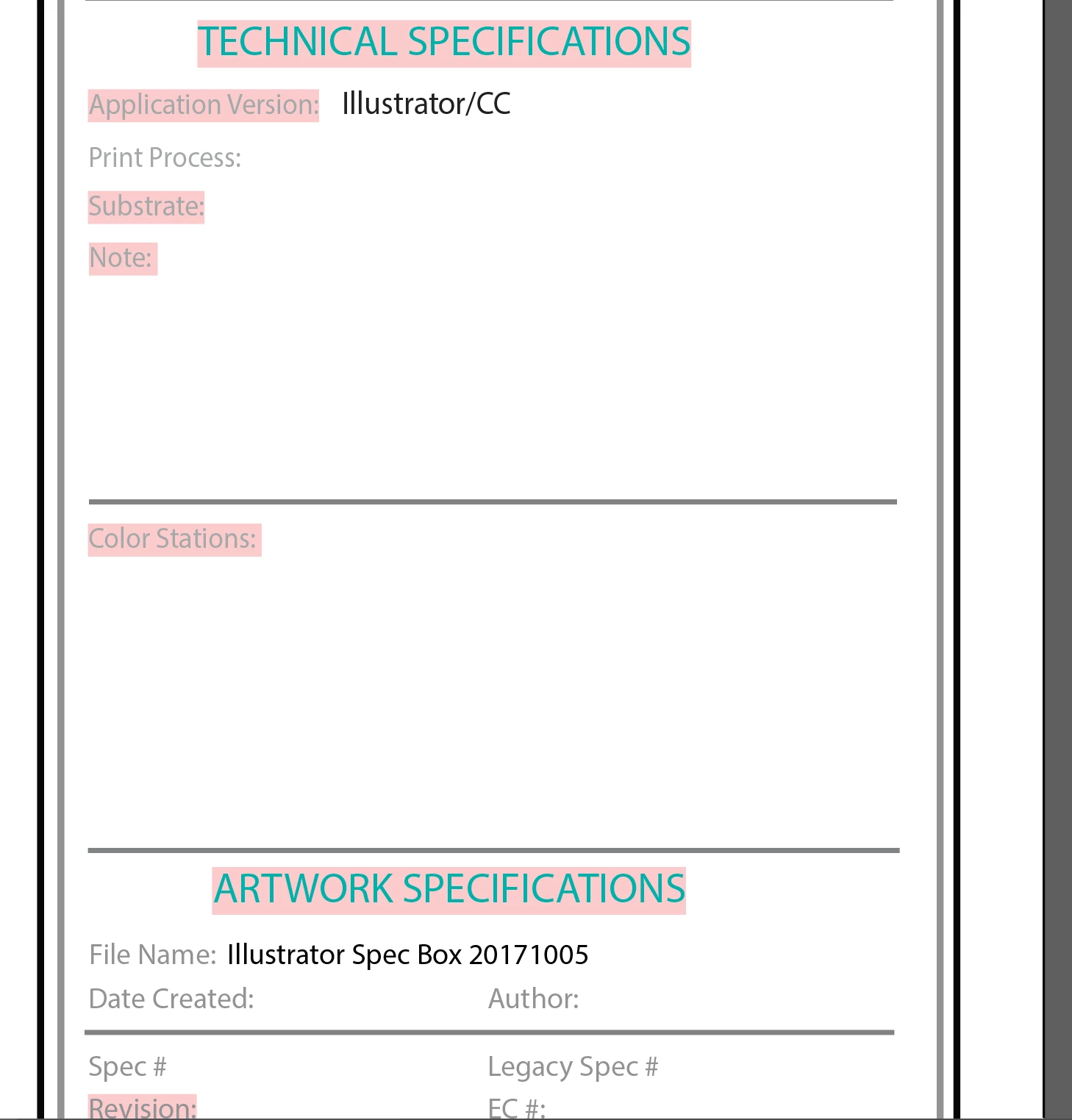
Step 2: Deleting the plugin.

In order to confirm that the plugin code doesn't rerun, I deleted it before reopening the .ai file to see if any changes were saved.

Step 3: Reopening the .ai file without the plugin to check if the changes were saved

As seen below, all text fields to be shown were actually saved and the file name was removed too.
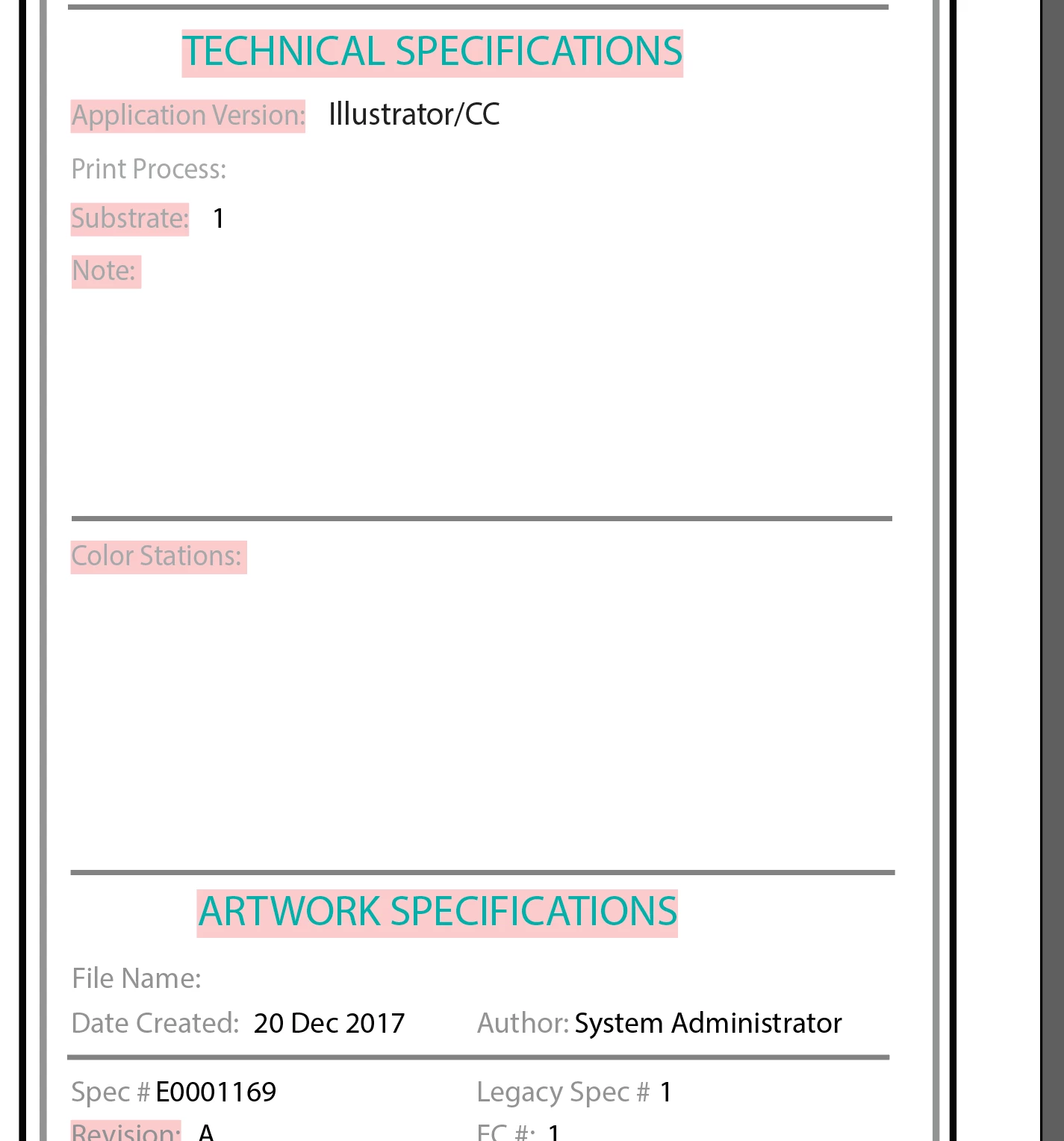
It all seemed to work fine previously and I'm puzzled by this! Any help would be truly appreciated!

Here's the code snippet I've used:

ATE::ICharFeatures features;

FontRef fontRef;

AIFontKey fontKey;

features.SetFontSize(10);

AIArtHandle newFrame;

SnpArtHelper artHelper;

/*

CODE FOR REMOVING TEXT

...............................................

*/

if (bClearTextFields)

{

     if (tmpFontSize == fontSize)

     {

          // Remove the text if the font size matches the configured one!

          textRange.Remove();

     }

}

/*

CODE FOR CREATING TEXT

...............................................

*/

// Get the group art that contains all the art in the current layer.

AIArtHandle artGroup = NULL;

result = sAIArt->GetFirstArtOfLayer(NULL, &artGroup);

aisdk::check_ai_error(result);

// Add the new point text item to the layer.

AITextOrientation orient = kHorizontalTextOrientation;

AIArtHandle textFrame = NULL;

result = sAITextFrame->NewPointText(kPlaceAboveAll, artGroup, orient, newAnchor, &textFrame);

aisdk::check_ai_error(result);

// Set the contents of the text range.

TextRangeRef range = NULL;

result = sAITextFrame->GetATETextRange(textFrame, &range);

aisdk::check_ai_error(result);

ITextRange crange(range);

string text = "1";

crange.SetLocalCharFeatures(features);

crange.InsertAfter(ai::UnicodeString(text).as_ASUnicode().c_str());

/*

CODE FOR SAVING THE FILE

...................................

*/

// TODOs: Ask client if the file is to be autosaved.

boolean bAutoSaveFile = true;

if (bAutoSaveFile)

{

     // Save the .AI file once showing

     AIDocumentHandle documentHandle;

     sAIDocument->GetDocument(&documentHandle);

     sAIDocumentList->Save(documentHandle);

}

This topic has been closed for replies.
Correct answer LeoTaro

Ok. I've removed all XML/XMP code and created a single text field using the code below. Again, the field did get displayed without calling the save() function. And as before, it didn't show up when the save() function was called.

AIRealPoint tmpAnchor;

  tmpAnchor.h = 528.66622161865234;

  tmpAnchor.v = -668.91015625000000;

  string tmpText = "This is some temp text!";

  // Get the group art that contains all the art in the current layer.

  AIArtHandle tmpArtGroup = NULL;

  result = sAIArt->GetFirstArtOfLayer(NULL, &tmpArtGroup);

  aisdk::check_ai_error(result);

  // Add the new point text item to the layer.

  AITextOrientation tmpOrient = kHorizontalTextOrientation;

  AIArtHandle tmpTextFrame = NULL;

  result = sAITextFrame->NewPointText(kPlaceAboveAll, tmpArtGroup, tmpOrient, tmpAnchor, &tmpTextFrame);

  aisdk::check_ai_error(result);

  TextRangeRef tmpRange = NULL;

  result = sAITextFrame->GetATETextRange(tmpTextFrame, &tmpRange);

  aisdk::check_ai_error(result);

  ITextRange tmpCRange(tmpRange);

  tmpCRange.InsertAfter(ai::UnicodeString(tmpText).as_ASUnicode().c_str());

  AIDocumentHandle documentHandle;

  sAIDocument->GetDocument(&documentHandle);

  sAIDocumentList->Save(documentHandle);


I tried your code and found a couple of minor issues:

1. I wasn't getting the text to appear even without the save until I changed this line:

tmpCRange.InsertAfter(ai::UnicodeString(tmpText).as_ASUnicode().c_str());

to (I guess the temporary unicodestring was going out of scope):

ai::UnicodeString uniStr(tmpText);

tmpCRange.InsertAfter(uniStr.as_ASUnicode().c_str());

2. This line is not really valid:

result = sAITextFrame->NewPointText(kPlaceAboveAll, tmpArtGroup, tmpOrient, tmpAnchor, &tmpTextFrame);

kPlaceAboveAll means place above all other art and the second argument should be NULL in this case. If you want to put the art at the top of tmpArtGroup, you should use kPlaceInsideOnTop.

With both these changes I was still seeing the same behaviour as you. Not sure why this is happening, but the "zero timer" workaround seems to work. This can be used to separate two pieces of code that interfere with each other.

Replace this code:

AIDocumentHandle documentHandle;

sAIDocument->GetDocument(&documentHandle);

sAIDocumentList->Save(documentHandle);

with:

AITimerHandle timer;

sAITimer->AddTimer(message->d.self,"SaveTimer",0,&timer);

Then in the GoTimer function replace:

SnippetRunnerUnitTestManager::Instance()->GoTimer(message);

with:

AIDocumentHandle documentHandle;

sAIDocument->GetDocument(&documentHandle);

sAIDocumentList->Save(documentHandle);

sAITimer->SetTimerActive(message->timer,false);

Don't forget the last line to deactivate the timer or it will repeat forever.

1 reply

Known Participant
January 9, 2018

I just found out that the above issue only occurs if I call the sAIDocumentList->Save(documentHandle) function. It works fine otherwise. Any tips would be appreciated!

Inspiring
January 10, 2018

You could try calling sAIUser->AppIdle() and/or sAIDocument->SyncDocument() before sAIDocumentList->Save.

Known Participant
January 10, 2018

Thank you for your response. I tried calling sAIUser->AppIde(), then tried calling sAIDocument->SyncDocument() before sAIDocumentList->Save() but it didn't work. I also tried calling both functions at the same time but still no luck.