
Deaf_Guy
Inspiring
January 3, 2023
Answered

Text on Path Moves Around When Image is Enlarged

  • January 3, 2023
  • 2 replies
  • 2150 views

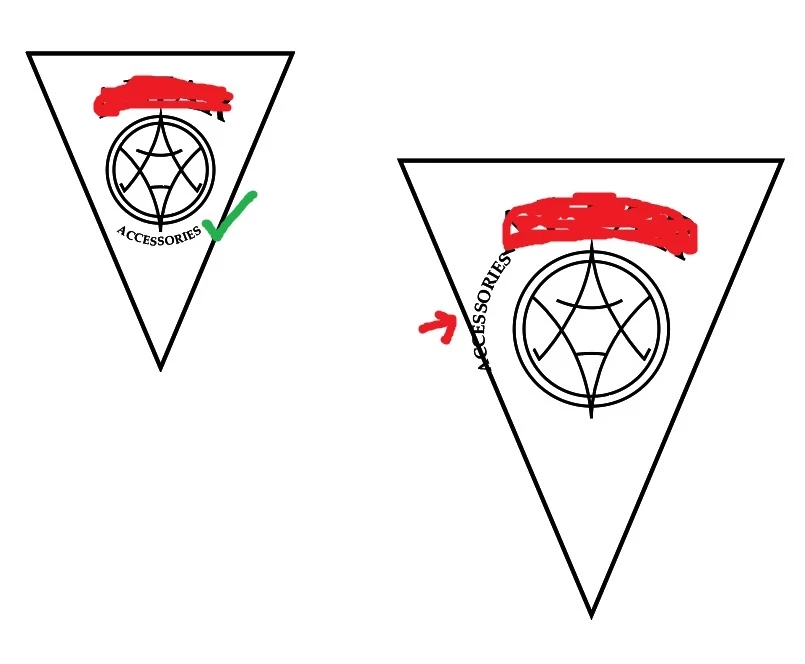
I've recreated a logo for someone. I'm not great with Illustrator but was able to get it looking pretty close. The left image is the result (I rubbed out the name above in red). But when it was time to Select All and enlarge the entire design, the ACCESSORIES word, which is on a text to path, starts moving around [seen at right].


Can someone tell me what I need to do to keep that from happening? I don't know if this matters but I use layers when I do this kind of thing. I put various drawings on various layers. The ACCESSORIES word is on a path on its own layer. Just wanted to mention it.
 

This topic has been closed for replies.
Correct answer Monika Gause

Thank you so much will try this


You're welcome. If you run into issues, please do not hesitate to ask. You might also take a look at tutorials: https://helpx.adobe.com/illustrator/how-to/text-basics.html

https://smallbusiness.chron.com/change-stroke-shape-adobe-illustrator-27751.html

2 replies

Anshul_Saini
Community Manager
Community Manager
January 20, 2023

Hi @Deaf_Guy,


We are sorry for the trouble. I checked with the team, and this issue was addressed in Illustrator v26.1. However, we have discovered this issue happens with some older files created on an older version of Illustrator.


Also, this is mainly happening due to the path created as a rounded rectangle disguised as Circle, which causes the issue while editing it.


Would you mind sharing the file with us for further investigation if this is not the case?


Kindly update the discussion if you still need assistance with it. We'd be happy to help.


Thanks,
Anshul Saini

Deaf_Guy
Deaf_GuyAuthor
Inspiring
January 23, 2023

Hi - I'm finished with that project but the next time it happens again [if it does] I'll be sure to post the file. Thanks for following up.

Anshul_Saini
Community Manager
Community Manager
January 27, 2023

Glad to hear that, @Deaf_Guy. Sure! Please feel free to reach out if you run into this or any other questions or issues in the future. We'd be happy to help.


Thanks,
Anshul Saini

Monika Gause
Community Expert
Community Expert
January 3, 2023

THis was a bug in a recent version. Which version are you using?

Deaf_Guy
Deaf_GuyAuthor
Inspiring
January 3, 2023

Thanks for letting me know. Here's my version. I just started a new job today and am just starting to use their Creative Suite. That's the version below that I'm using.


Monika Gause
Community Expert
Community Expert
January 3, 2023

That is the latest version. You could try and rebuild the preferences (this will erase your settings - rename the preferences folder because that can be undone).


https://helpx.adobe.com/illustrator/using/setting-preferences.html