Participating Frequently
May 10, 2019
Answered

Text resize not working

  • May 10, 2019
  • 2 replies
  • 8622 views

I am an Ai newbie, using Creative Cloud.  I created a document that is 13500×11462 with a transparent background for uploading as a PNG to Redbubble.  The text will only allow me to resize to 1296.  I tried using the Selection Tool and it allows me to increase the size but as soon as I let go it snaps back to its original size.  Same with the Scale Tool; as soon as I let go it snaps back. 

How do I fix this so I can adjust the size/shape of my text?
This topic has been closed for replies.
Correct answer Rob de Winter

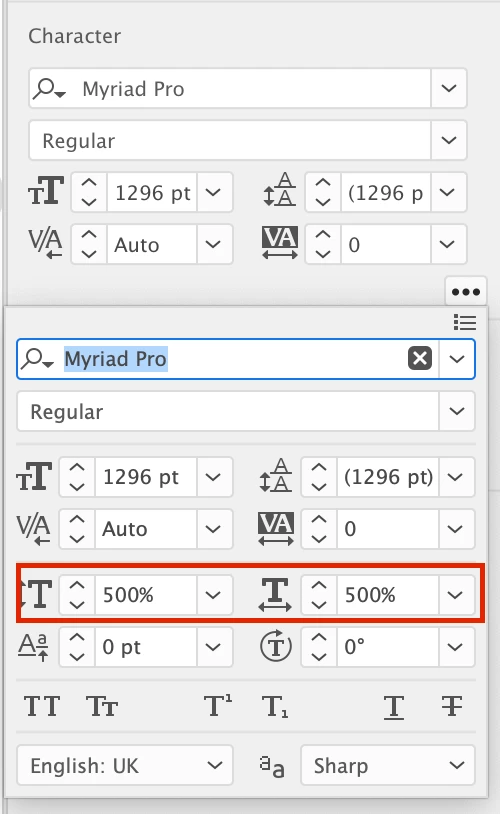
You can also scale it with the scaling options in the Properties Panel. Just enter 1296pt in the font size field, and then scale up proportionally by entering the values in the vertical and horizontal scale fields (I entered 500% in both fields, as you can see in the screenshot below). After that you can just scale your text down (if necessary) with the Selection Tool.

Hope this helps!

2 replies

Rob de WinterCommunity ExpertCorrect answer
Community Expert
May 10, 2019

You can also scale it with the scaling options in the Properties Panel. Just enter 1296pt in the font size field, and then scale up proportionally by entering the values in the vertical and horizontal scale fields (I entered 500% in both fields, as you can see in the screenshot below). After that you can just scale your text down (if necessary) with the Selection Tool.

Hope this helps!

Participating Frequently
May 10, 2019

Yes!  This helped me the most, thank you very much. 

Thank you, everyone, for your help.

Community Expert
May 10, 2019

You’re welcome, and good to hear that it helped!

Jacob Bugge
Community Expert
Community Expert
May 10, 2019

SkyDestrier,

It is a limit on live Type options, going all the way back to the workspace/artboard size of 1296pt in the old days.

For live Type, you can only Effect>Distort & Transform>Transform>Scale by the % values to get the desired size, with the limitations inherent with Effects which matter little if no further change is made.

Or you may outline with potentially far greater/graver limitations.

Participating Frequently
May 10, 2019

Wow, there's no other way around that?  I'm only able to increase the text by 200% that way.  For all the power behind these programs, I would expect to be able to do more!

Thanks for your help.

Monika Gause
Community Expert
Community Expert
May 10, 2019

SkyDestrier  schrieb

Wow, there's no other way around that?  I'm only able to increase the text by 200% that way.  For all the power behind these programs, I would expect to be able to do more!

Thanks for your help.

You can enter much higher values by just typing them into the dialog box.