Participant
January 12, 2023
Answered

Text shifting out of baseline on different sizes

  • January 12, 2023
  • 1 reply
  • 1935 views

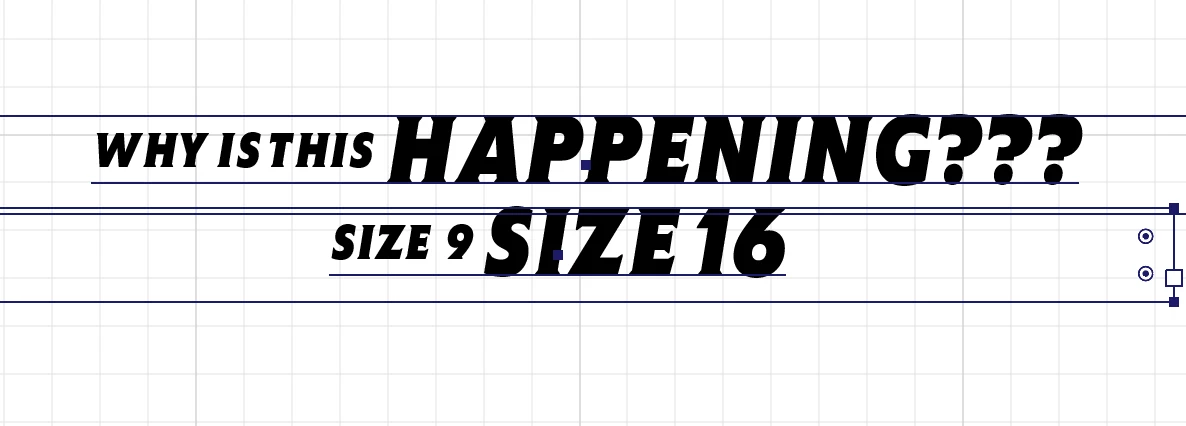
While working today over a couple of files, I spotted something funny. While placing text, and changing either size or height size, the smaller font goes up from the baseline. I need it to stay on the baseline (the same way it does in InDesign), and I need it to keep this as text. 

Also, the Snap to Glyph feature doesn't seem to do the job. 
Any ideas why is this happening?
Correct answer Héctor15C3

It's the lastest version (27.1.1) somehow it got a style attached. Had to reset the whole Character panel, that did the trick.

1 reply

Omar.Fathy
Community Expert
Community Expert
January 13, 2023

Which Ai version are you using?
The last version doesn't change the text baseline when you change the size.

____
T\Solutions in the thread below will help you:
https://community.adobe.com/t5/illustrator-discussions/align-different-sized-text-to-the-bottom-of-the-text-baseline/td-p/11666573


Héctor15C3AuthorCorrect answer
Participant
January 19, 2023

It's the lastest version (27.1.1) somehow it got a style attached. Had to reset the whole Character panel, that did the trick.

Anubhav M
Community Manager
Community Manager
January 25, 2023

Hello @Héctor15C3,


Glad to hear that resetting the Character Panel helped resolve the problem.

Feel free to reach out if you have more questions or need assistance. We'd be happy to help.


Thanks,

Anubhav