Participant
July 20, 2017
Answered

Text staying black when trying to fill with a coloured gradient.

  • July 20, 2017
  • 3 replies
  • 7924 views

Hi,

When I try to apply a coloured gradient to the fill of the text, the text stays black and the gradient does not apply. (but I can apply normal colour.)

However, when I try and apply the gradient to shapes and vectors it works no problem! I have tried multiple forums already but none are clear, I also have a deadline for this piece so any help asap would be beneficial!

Thanks!

This topic has been closed for replies.
Correct answer Mike_Gondek10189183

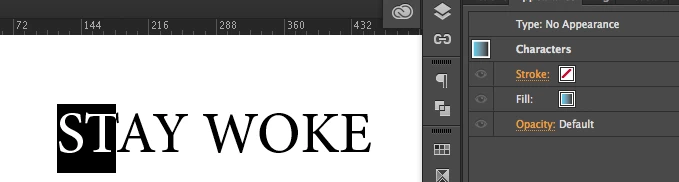
Make sure you have the gradient is not applied at the character level, by having letters highlighted.

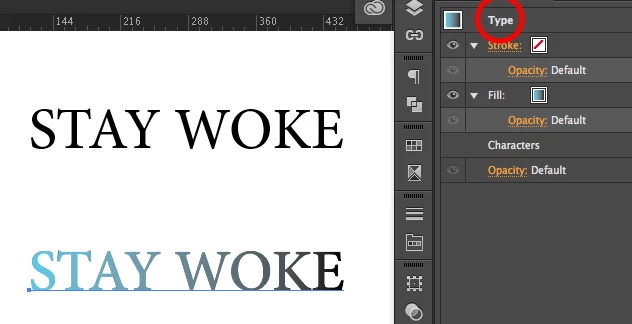
but at the type level, by using the pointer tool

Though you can apply colors at the charachter level, but  gradients at the character level paper to not be working.

3 replies

Mike_Gondek10189183
Community Expert
Mike_Gondek10189183Community ExpertCorrect answer
Community Expert
July 20, 2017

Make sure you have the gradient is not applied at the character level, by having letters highlighted.

but at the type level, by using the pointer tool

Though you can apply colors at the charachter level, but  gradients at the character level paper to not be working.

Ellie2304Author
Participant
July 20, 2017

Hi Mike,

Thanks for all your help, it worked!

Jeff Witchel, ACI
Community Expert
Community Expert
July 20, 2017

Here's a video tutorial about applying Gradients to type: http://www.jeffwitchel.net/2012/03/apply-an-impossible-gradient-to-editable-type/

Ellie2304Author
Participant
July 20, 2017

Hi Jeff,

Thanks for all your help!

Jeff Witchel, ACI
Community Expert
Community Expert
July 20, 2017

Hi Neil, Please mark an answer as correct if it worked. So people stop answering your question. Thanks! Jeff

Jacob Bugge
Community Expert
Community Expert
July 20, 2017

Neil,

In the Appearance palette flyout click Add New Fill, then set the gradient. It is best to set the original fill to None first.

Monika Gause
Community Expert
Community Expert
July 20, 2017

It's important to select the text object with the selection tool and not the text with the text tool for this to work.

Ellie2304Author
Participant
July 20, 2017

Hi Monika,

Thanks for all your help!