


Inspiring
May 21, 2026
Question

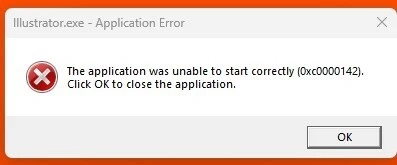
The application was unable to start correctly 0xc0000142 - Illustrator on Windows
  • May 21, 2026
  • 2 replies
  • 126 views
error message appears when attempting to open InDesign as well as illustrator

I have experienced this error when attempting to open InDesign and illustrator several times over the course of a few months now. There is a fix that I found through the Adobe forums that involves repairing the Microsoft Visual C++ Redistributable program files and it works temporarily, but after a few weeks the problem reappears. I have tried installing several versions of both programs to see if it is just affecting a specific version, but it does not appear to make a difference. Please assist when possible, as I require authorization from my company’s tech support department in order to perform the fix every time this problem occurs and it is interfering with my job. Thank you

    2 replies

    Anubhav M
    Community Manager
    Community Manager
    May 28, 2026

    Hi @jasminet88,

    Sorry to hear InDesign and Illustrator aren't launching. Hopefully JEL's suggestions helped. If they did, please mark the helpful reply as the correct answer to help others facing the same issue.

    If the problem is still occurring, try a clean reinstall of the Microsoft Visual C++ Redistributable, which often resolves this kind of startup failure:

    1. Close all Adobe apps.
    2. Uninstall every Microsoft Visual C++ Redistributable package currently installed on your system.
    3. Download and install the latest version from Microsoft: https://learn.microsoft.com/en-us/cpp/windows/latest-supported-vc-redist?view=msvc-170
    4. Relaunch Illustrator (or InDesign) after rebooting your computer.


    Let us know how it goes.

    Anubhav

    J E L
    Community Expert
    Community Expert
    May 21, 2026

    HI ​@jasminet88, you are in the Photoshop forum, so your post might be moved to the Illustrator (or InDesign) forum. Meanwhile, try running a System File Checker. Here are the instructions: https://support.microsoft.com/en-us/topic/use-the-system-file-checker-tool-to-repair-missing-or-corrupted-system-files-79aa86cb-ca52-166a-92a3-966e85d4094e


    • Open Command Prompt as an administrator.

    • Run sfc /scannow.

    • After completion, run DISM /Online /Cleanup-Image /RestoreHealth.

    • Restart your PC.