

Participant
July 9, 2022
解決済み

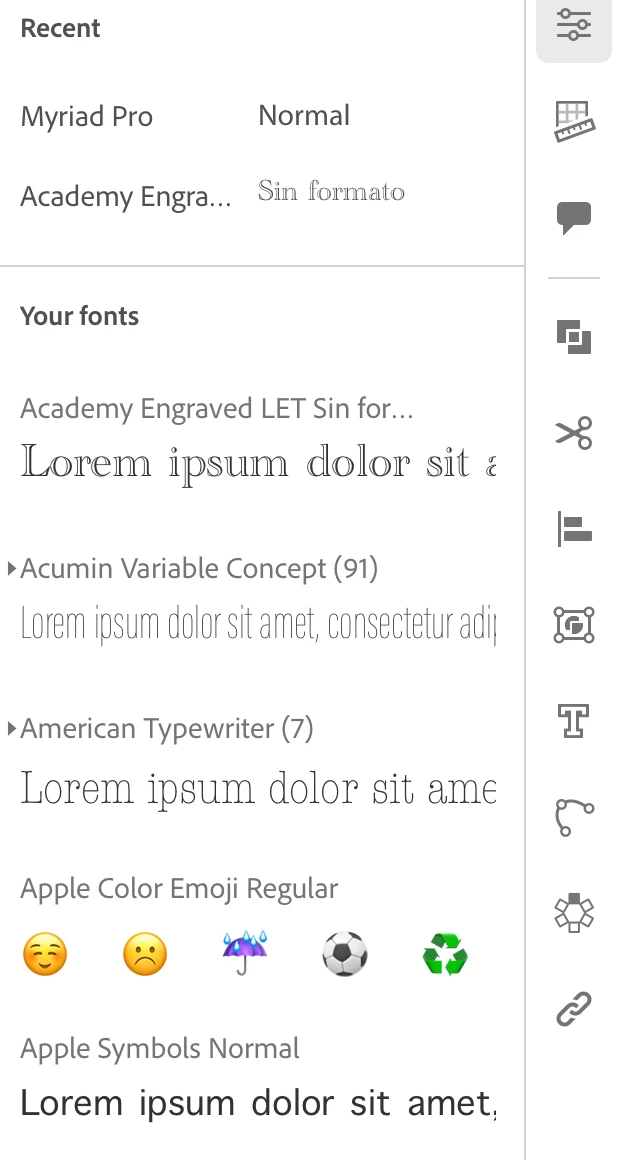
The “+” icon to add a new font does not appears. Can you help me to add a new font on my iPad ?

  • July 9, 2022
  • 返信数 5.
  • 454 ビュー

Like you can see, the + Icon does not appears in my iPad and I can't add a new font, please help me with this issue. The picture for reference:

 

このトピックへの返信は締め切られました。
解決に役立った回答 Anubhav M

Hello @Atojantonio,


Thanks for your response. We have checked your account & found that you own a Federated Adobe ID. Your Adobe Admin Console administrator controls the Fonts services. I would request you to contact the team, and they will do the needful.


Thanks,
Anubhav

返信数 5

Anubhav M
Community Manager
Community Manager
July 11, 2022

Hello @Atojantonio,


Sorry to hear about this experience. I would request you to try restarting your iPad and check if it helps. Also, kindly try removing and reinstalling Illustrator on your iPad and share your observations with us.


Looking forward to your response.


Thanks,

Anubhav

Atojantonio作成者
Participant
July 11, 2022

Hi, Anubhav


Thank you very much for your prompt response. I just did what you suggested me and still don`t appears the "+" icon. Can you help me with this issue please? 


I will be waiting for your support.


Regards


Antonio

Anubhav M
Community Manager
Anubhav MCommunity Manager解決!
Community Manager
July 12, 2022

Hello @Atojantonio,


Thanks for your response. We have checked your account & found that you own a Federated Adobe ID. Your Adobe Admin Console administrator controls the Fonts services. I would request you to contact the team, and they will do the needful.


Thanks,
Anubhav
