Davezilla Media
Participant
August 25, 2023
Answered

The latest Illustrator Beta won't launch anymore

  • August 25, 2023
  • 3 replies
  • 3373 views

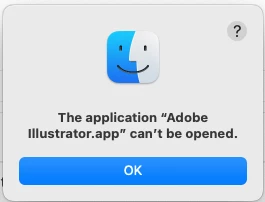
I have been using the Illustrator Beta exclusively for a few months now with no issues until today. It simply won't launch. I was using it yesterday and it was fine. No other updates or changes to my Mac. Attached is a screenshot of the error message. Is this happening for a reason, or do I need to re-install?

This topic has been closed for replies.
Correct answer Anshul_Saini

Hello @Davezilla Media,


I understand your frustration with Illustrator Beta not launching after using it without issues. I'm here to assist you in resolving this matter. It's great that you've already tried rebooting and resetting preferences.

Considering your macOS version (13.4.1) and your efforts to keep your Mac up to date, there are a couple of steps you could try:

  • Ensure you have the latest version of Illustrator Beta. We released a new beta, v28.0.0.10 today. You can manually try updating to this version from the Creative Cloud desktop app and see if it resolves the issue.

  • macOS security settings might prevent applications from launching. Go to your macOS System Settings, click on "Privacy & Security" in the sidebar, then navigate to the "Security" section. There, you might find an "Open Anyway" option next to a message about the Illustrator Beta app being blocked from opening. Clicking this button should allow the app to launch.


Feel free to try these steps, and if the issue still remains, don't hesitate to reach out for further assistance. Thanks, @Monika Gause, for tagging me and bringing this issue to my attention.


Best regards,

Anshul Saini

3 replies

Participant
January 9, 2024

Not sure if this will help anyone. For some reason having InDesign open then opening Illustrator (either version) would cause this issue for me. Closing InDesign allowed illustrator to open as normal.

Anshul_Saini
Community Manager
Anshul_SainiCommunity ManagerCorrect answer
Community Manager
August 25, 2023

Hello @Davezilla Media,


I understand your frustration with Illustrator Beta not launching after using it without issues. I'm here to assist you in resolving this matter. It's great that you've already tried rebooting and resetting preferences.

Considering your macOS version (13.4.1) and your efforts to keep your Mac up to date, there are a couple of steps you could try:

  • Ensure you have the latest version of Illustrator Beta. We released a new beta, v28.0.0.10 today. You can manually try updating to this version from the Creative Cloud desktop app and see if it resolves the issue.

  • macOS security settings might prevent applications from launching. Go to your macOS System Settings, click on "Privacy & Security" in the sidebar, then navigate to the "Security" section. There, you might find an "Open Anyway" option next to a message about the Illustrator Beta app being blocked from opening. Clicking this button should allow the app to launch.


Feel free to try these steps, and if the issue still remains, don't hesitate to reach out for further assistance. Thanks, @Monika Gause, for tagging me and bringing this issue to my attention.


Best regards,

Anshul Saini

Davezilla Media
Participant
August 26, 2023

Thank you. It was definitely corrupted. Re-installing it did the trick. 

Anshul_Saini
Community Manager
Community Manager
August 28, 2023

Thank you for providing an update, @Davezilla Media. I'm relieved to hear that the issue has been resolved through reinstallation.


If you ever have more questions or encounter any other challenges, please don't hesitate to reach out. The community is here to help and support you. Wishing you smooth and uninterrupted creative endeavors ahead!


Best regards,

Anshul Saini

Monika Gause
Community Expert
Community Expert
August 25, 2023

Did you already reboot the computer and reset the Illustrator preferences?

Davezilla Media
Participant
August 25, 2023

Yes, I rebooted and did the option+Command+Shift boot, but it will not launch.