
Inspiring
October 20, 2024
Answered

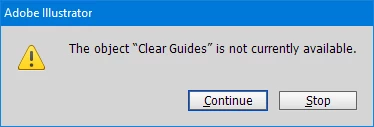
The object "Clear Guides" is not currently available.

  • October 20, 2024
  • 1 reply
  • 306 views

I made an action to clear guides and call it from a script but in case there are no guides this error apears. 
Is it possible to not show this error if there are no guides in the current document?  
 

I did not find function doScript in Illustrator scripting guide.


This topic has been closed for replies.
Correct answer sttk3

I offer two solutions.


  1. Set app.userInteractionLevel to UserInteractionLevel.DONTDISPLAYALERTS before executing the action
  2. Use executeMenuCommand instead of the action
(function() {
  if(app.documents.length <= 0) {return ;}
  
  // solution 1: set app.userInteractionLevel to UserInteractionLevel.DONTDISPLAYALERTS
  var oldInteractionLevel = app.userInteractionLevel ;
  try {
    app.userInteractionLevel = UserInteractionLevel.DONTDISPLAYALERTS ;
    app.doScript('Clear Guide', 'Set Name') ;
  } finally {
    app.userInteractionLevel = oldInteractionLevel ;
  }

  // solution 2: executeMenuCommand
  app.executeMenuCommand('clearguide') ;
})() ;

1 reply

sttk3Correct answer
Legend
October 20, 2024

I offer two solutions.


  1. Set app.userInteractionLevel to UserInteractionLevel.DONTDISPLAYALERTS before executing the action
  2. Use executeMenuCommand instead of the action
(function() {
  if(app.documents.length <= 0) {return ;}
  
  // solution 1: set app.userInteractionLevel to UserInteractionLevel.DONTDISPLAYALERTS
  var oldInteractionLevel = app.userInteractionLevel ;
  try {
    app.userInteractionLevel = UserInteractionLevel.DONTDISPLAYALERTS ;
    app.doScript('Clear Guide', 'Set Name') ;
  } finally {
    app.userInteractionLevel = oldInteractionLevel ;
  }

  // solution 2: executeMenuCommand
  app.executeMenuCommand('clearguide') ;
})() ;