


Participant
June 11, 2025
Question

The objects aren't aligning accurately to the artboard.

  • June 11, 2025
  • 4 replies
  • 550 views

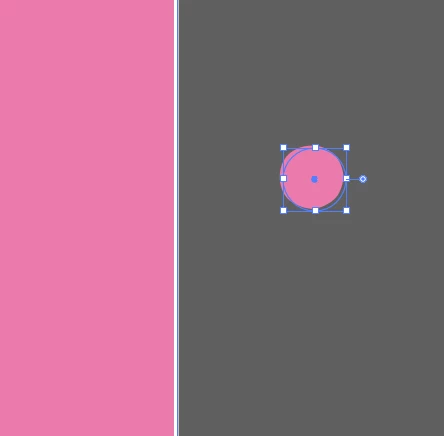
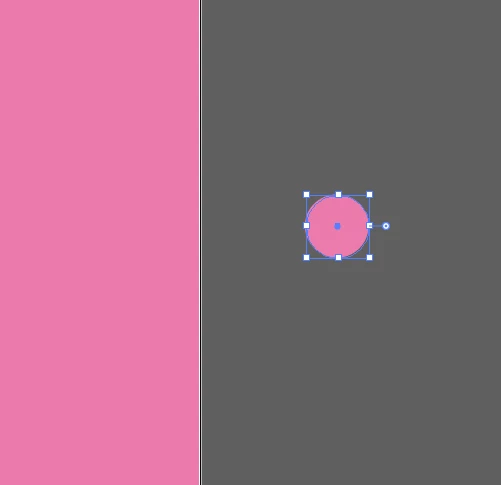
I'm having an issue where the object selection box doesn't match the actual object's edges. This misalignment causes problems when trying to snap objects to the artboard, and my JPG exports have a white, unfilled border.

The object offset is even more severe when using GPU Preview compared to CPU Preview.
4 replies

Community Expert
June 11, 2025

If you're seeing this outline offset glitch at 46000% zoom the objects in your example images must be really small. I've tried to re-create the issue on my system using similar tiny objects at maximum zoom level. I can see a bit of misalignment between the object's fill and the blue selection highlight outline. The offset is more visible in GPU Preview than CPU Preview. The misalignment doesn't seem as bad as it appears in your examples. I uploaded a screen shot of what I'm seeing on my end.

If the objects are sized normally there is very little if any misalignment between the object's fill and the blue outline highlighting the object selection.


Regarding issues of white borders contaminating the edge detail of exported graphics: that will always happen if the object's edges aren't sized/aligned with the pixel grid of the exported object's target size/resolution. If the edges are lined up partially over the next pixel in the grid the edges will be fuzzy.


JPEG isn't a good format to use for exporting web-friendly versions of graphical items. PNG is far better. PNG will keep flat areas of color uniform looking. JPEG will introduce varying amounts of noise and macro-blocking into flat color areas, depending on how severe the data compression level may be. PNG also supports transparency. Any object edges that are fuzzy will look slightly less fuzzy in PNG format than JPEG. Still, it makes a difference to size/position vector artwork as "pixel perfect" as possible if it will be exported in PNG or JPEG formats.

Dave Creamer of IDEAS
Community Expert
Community Expert
June 11, 2025

What is your OS, OS version, GPU, GPU driver version?


David Creamer: Community Expert (ACI and ACE 1995-2023)
Monika Gause
Community Expert
Community Expert
June 11, 2025

Is that a Large Canvas document?

Ton Frederiks
Community Expert
Community Expert
June 11, 2025

I don't think so zoom in by 46000% is a regular canvas document (unless the percentage is wrong), you can only zoom to 6400% in a Large Canvas doc.

Bani Verma
Legend
June 11, 2025

Hi there, 


In order to better assist you, we need some more details. Could you please share the name and version of the Adobe app you are using to perform this task? 


Thanks,
^BS

?_?4049Author
Participant
June 11, 2025

I'm using the newest version of Illustrator 2025 (29.5.1). I've tried using the older one, 2024 (28), but it still has the same issue. The problem is that I have to zoom in by 46000% to notice this issue.

Bani Verma
Legend
June 11, 2025

Thank you for sharing the details with me. I am moving your question to the correct community board, experts there will be able to help you better. 


Thanks,
^BS